

 By Angel Flores

On this page11 sections
It’s Monday morning. A homeowner’s air conditioner is making a sound it didn’t make last summer, so she calls a heating and cooling company to get someone out for a tune-up.
Voicemail.
She leaves a message. The callback comes the next afternoon, while she’s in a meeting, so she calls back. "Does Tuesday work?" She’s at work Tuesday. "How about Thursday morning?" Three days and five messages later, she has an appointment.
Or she’s already booked someone else, because the company down the road has a "Book online" button. Two taps. Thursday at nine. Done.
People don’t want to schedule an appointment. They want to have one.
In the last episode, we talked about the people who aren’t ready yet, and the forms that give them a reason to raise their hand. This time, it’s the people who are ready. When someone’s ready, you want them on your calendar before they change their mind. And that takes more than a button.
In this episode, I’ll walk you through the six parts of a booking system, why each one breaks, and what I’d do about it. Everything here comes from a free guide I put together called The Booking System Blueprint. I’ll tell you where each piece lives in it as we go, so you can pick up the details when you’re ready to build.
"We just need a calendar on our website"
Here’s what I hear from a lot of owners. "We just need a calendar on our website."
And it’s a fair thing to think. Booking tools are good and affordable, and adding a "Book now" button takes an afternoon. It feels like the whole job.
So the button goes up, the tool gets connected, and then... not much happens. A few people book. Most still call. Some start the form and never finish it.
It’s easy to blame the tool, or the customer. But the people on your booking page came ready. Somewhere between "Book now" and "You’re booked," something gave them a reason to stop.
The gap is real, too. In a 2024 poll by MGMA, the Medical Group Management Association, 73 percent of medical practice leaders said a quarter or fewer of their patients book with digital tools. The option is there, and most patients still pick up the phone. In my experience, that’s because the booking setup makes calling easier.
A button is the front door, not the whole house
Here’s how I see it. The booking button is the front door. But a front door isn’t a house. Behind it are six rooms, and every one of them has to work. I call them zones.
When I map a booking system for a client, several systems are working together behind that door, from your website and calendar to your CRM, which is your customer database, plus your messages and your payments. And the work moves through the six zones, in order. First, you plan before you build. Second come the entry points, where people find you. Third is the booking flow, the screens people see. Fourth is the moment they book. Fifth is everything before the appointment. And sixth is what happens after, and how you measure it.
Here’s the part that changes how most people see it. The first two zones decide whether people start booking. The other four decide whether they finish, show up and come back. Most of it breaks after someone clicks Book.
In the blueprint, I mapped this whole system on two pages you can print and tape together, with every decision and every handoff marked. It’s the first thing I’d hang on the wall before setting anything up.
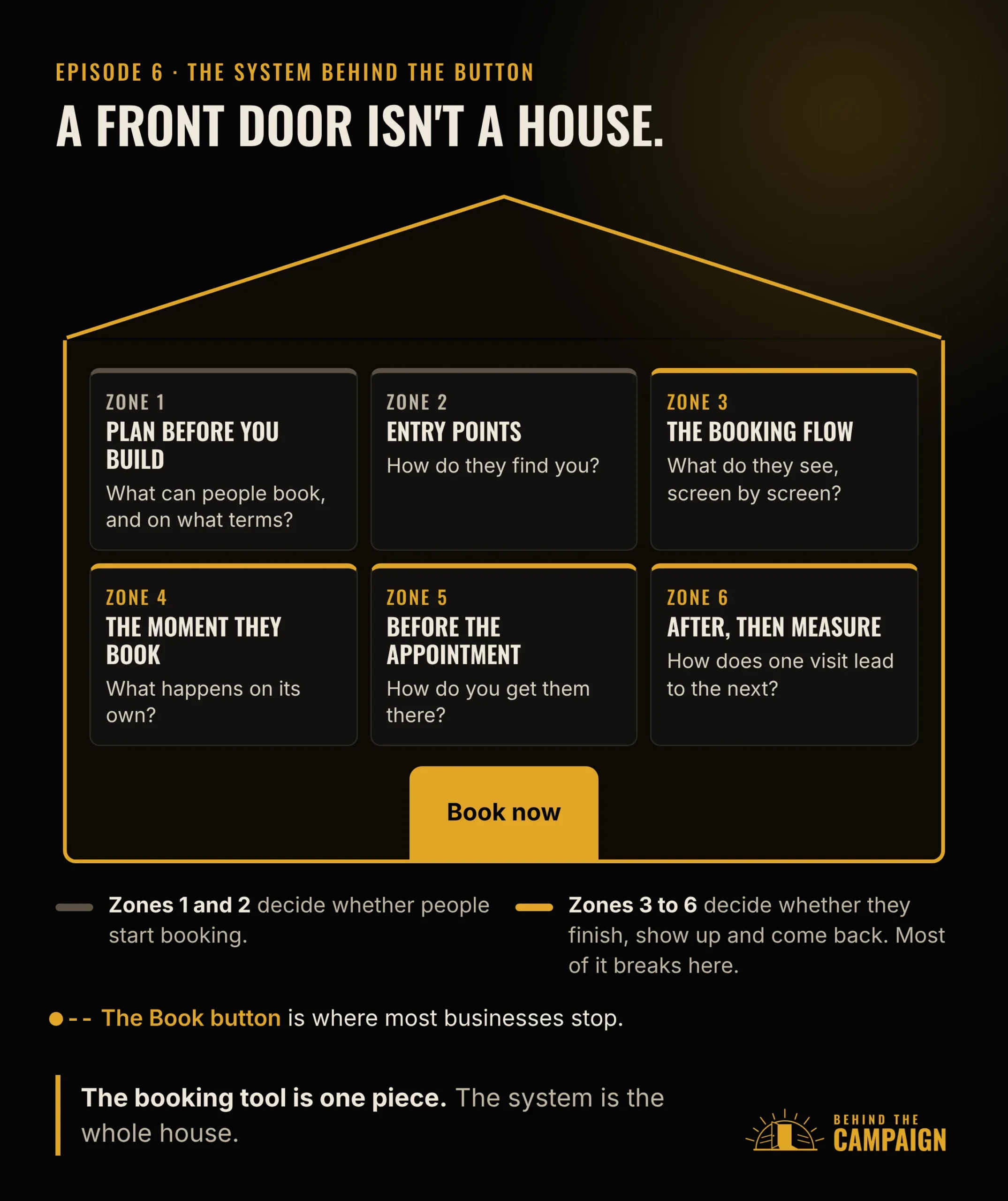
So let’s walk through the house, one room at a time.
Zone 1: Plan before you build
The first zone answers one question. What will you offer online, and on what terms?
It’s the zone most businesses skip, and two common failures start here. The first is a tool that doesn’t match how you really work. Appointment lengths, buffers and who can do what all live in someone’s head, so the tool books things your team can’t deliver. The second is that nobody owns it. The tool goes live, the team never gets trained, and the front desk keeps using the paper book.
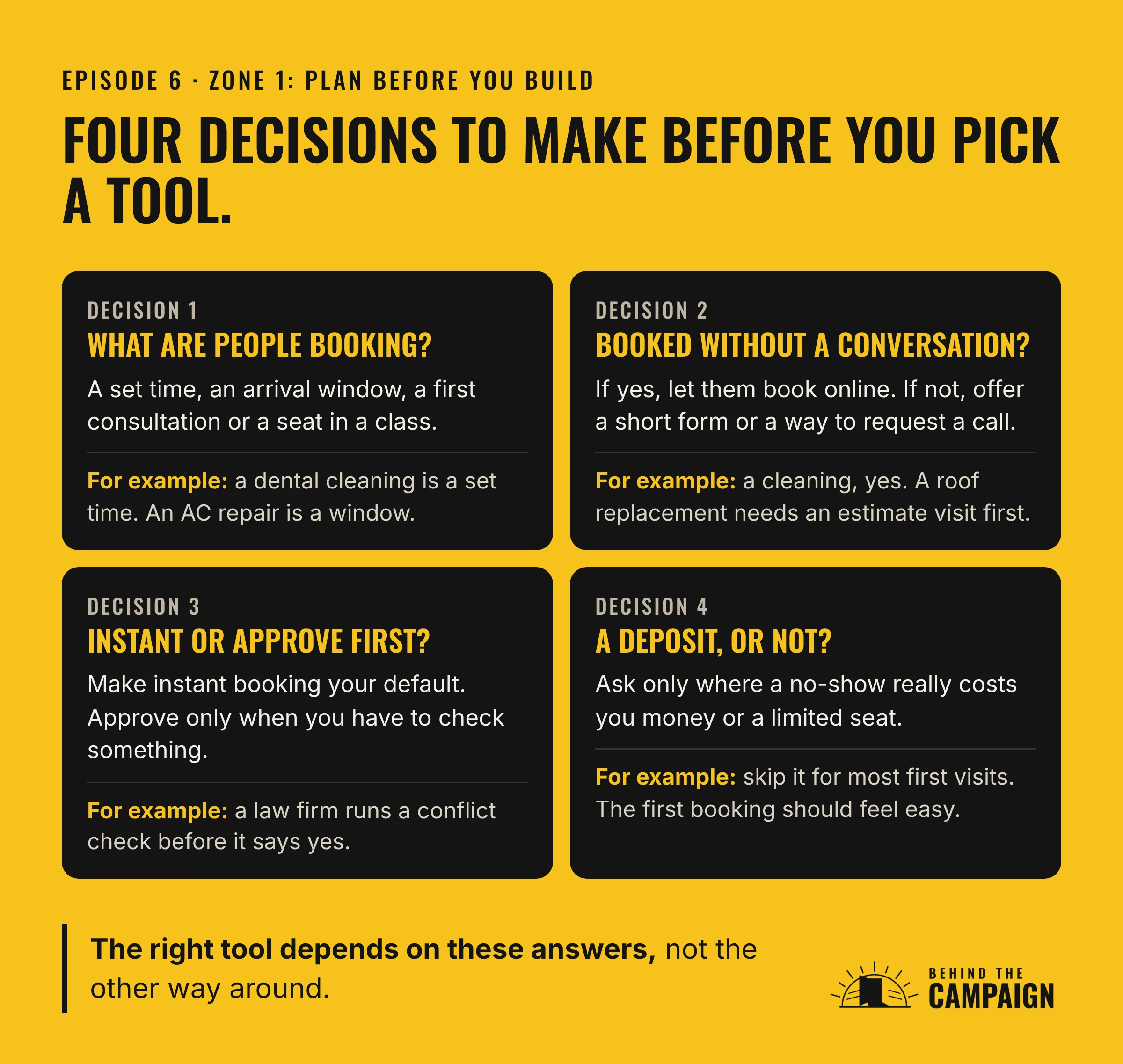
So before you build anything, make four decisions.
The first decision is what people are actually booking. A set time, like a dental cleaning? An arrival window, like an air conditioning repair? A first consultation, or a seat in a class? Each one changes the steps that follow.
The second is whether it can be booked without a conversation. A cleaning can be booked outright. A full roof replacement usually needs an estimate visit first, and that’s okay. For services like that, give people a short form or a way to request a call.
The third is whether to book instantly or approve first. Make instant booking your default, and save approval for when you really have to check something. A law firm, for example, has to run a conflict check before it can say yes.
And the fourth is whether to ask for a deposit. Ask only where a no-show really costs you money. For most first visits, skip it. The first booking should feel easy.
Then set your real-world rules, like your buffers, how much notice you need and your cancel policy. Name one person as the owner, and make sure everyone books into the same calendar.
One more thing from my own client work. Write your confirmation and reminder messages yourself before you go live. The default ones sound like nobody’s home, and your customers can tell.
Zone 1 in the blueprint walks through those four decisions, with a table you fill in for every service you offer.
Zone 2: Entry points
Now, how do people find you?
The second zone fails in two ways. The first is that nobody can find the Book button. It’s buried in a menu, it’s missing from your service pages, or your Google profile sends people to your homepage instead. The second is that phone bookings live somewhere else, in a paper book or a side calendar, so your online calendar offers times that are already taken.
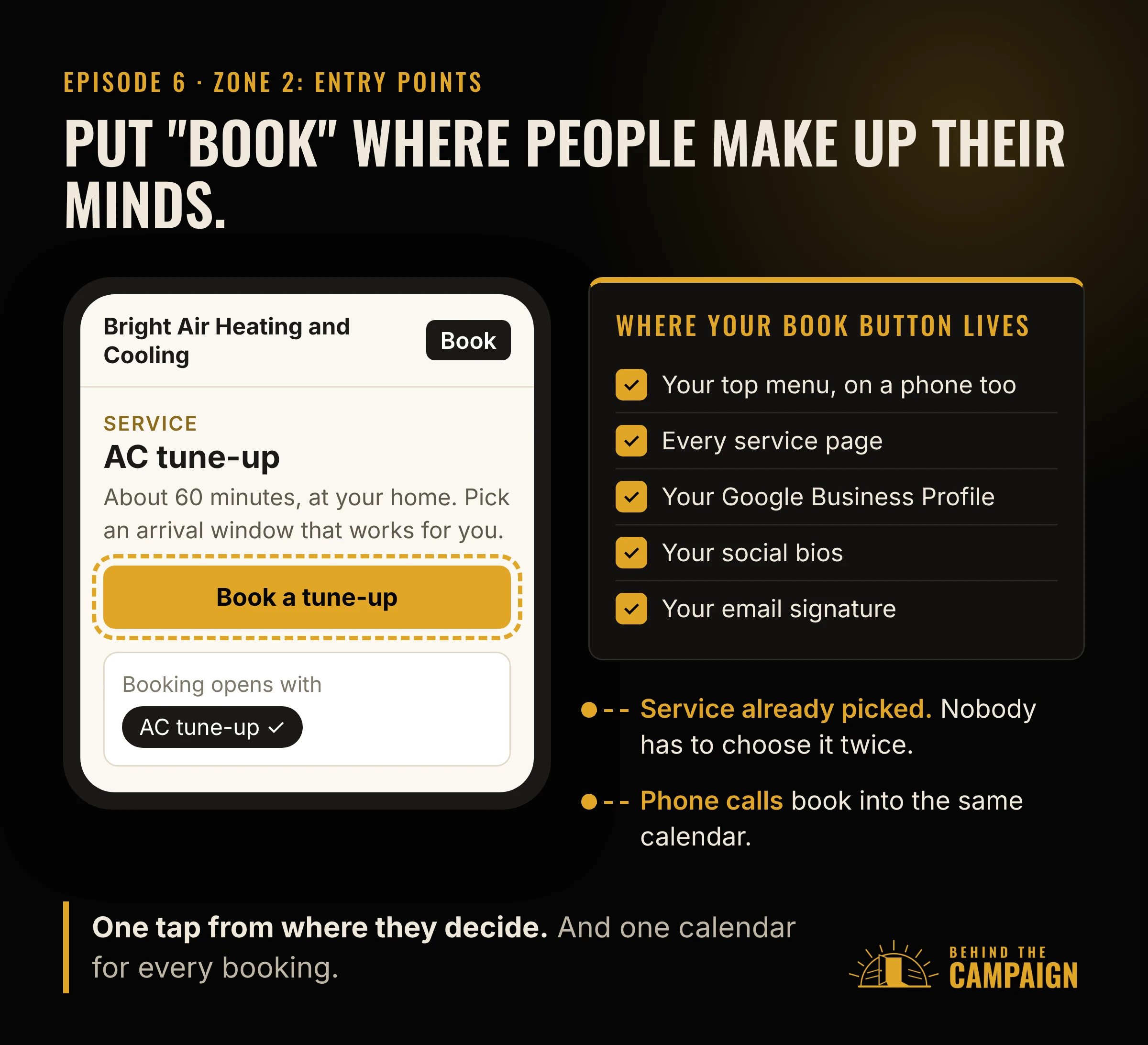
The fix starts with putting "Book" where people decide. People make up their minds on the page for the service they need, so that’s where the button belongs. Put it in your top menu, on every service page and on your Google profile, then anywhere else you share a link, like your social bios and your email signature. And when someone taps "Book a tune-up" on the tune-up page, open booking with the tune-up already picked. Don’t make them choose it again.
Add a tracking tag to each booking link, too, so every booking tells your CRM where it came from. That’s how you learn which marketing fills your calendar.
And keep the phone. In a 2024 secret-shopper study of 500 law firms, Clio found that only 40 percent picked up when they were called. Online booking catches the people your phone misses. So keep both, and book phone calls into the same calendar, so there’s only ever one schedule.
There’s a checklist in the blueprint of every place your Book button should live, on your site and off it.
Zone 3: The booking flow
The third zone is the one your customer sees, one screen at a time. It’s also where a lot of people quietly leave.
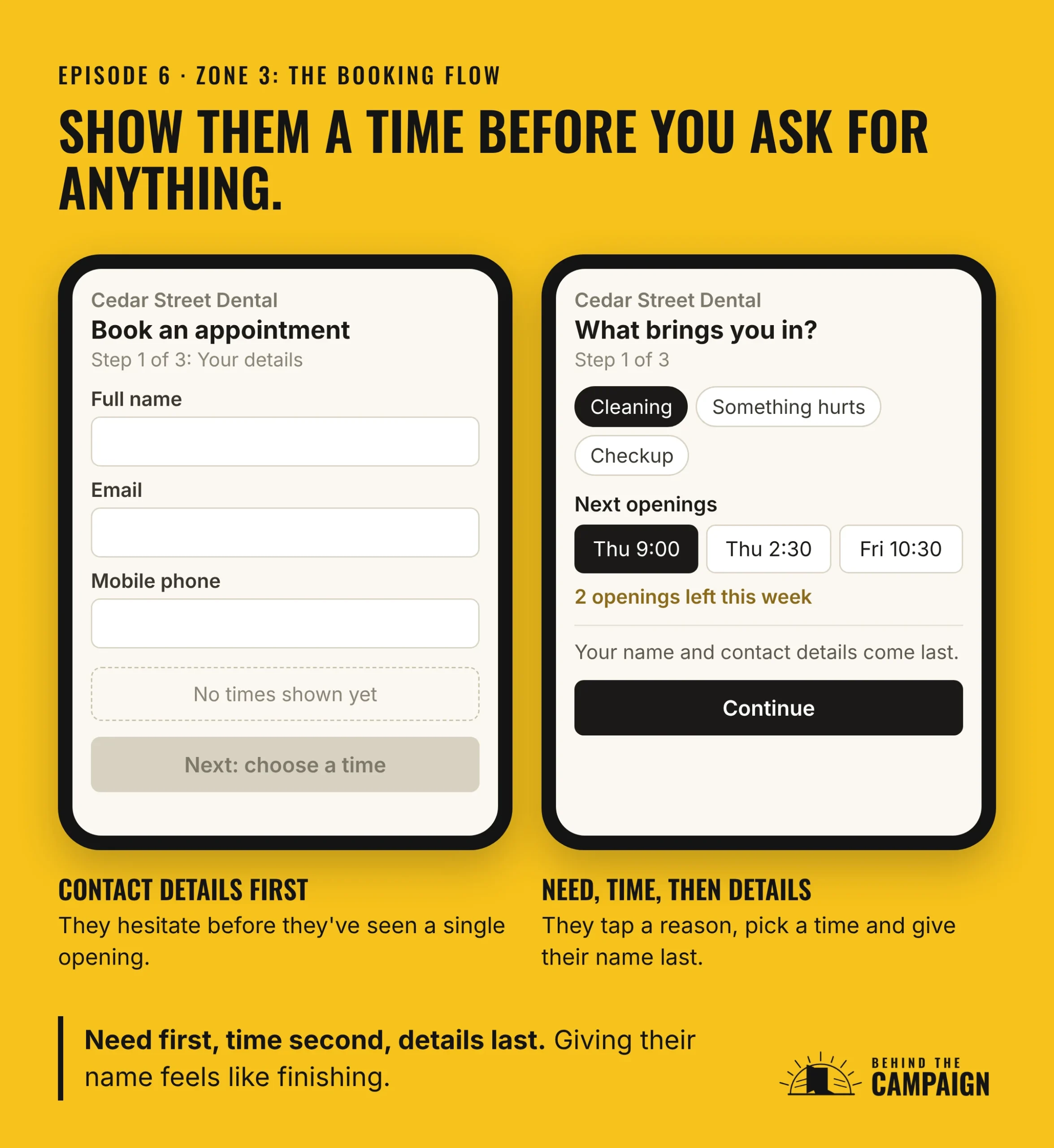
There are two big reasons. The first is a form that asks for name, phone and email before a single time shows up. It feels like a sales call. When contact details come first, you’re putting your interests ahead of theirs. The second is the opposite problem: it jumps straight to the calendar, with no "What brings you in?" first, so people aren’t sure they’re booking the right thing.
So here’s the order I’d use. Need first, time second, details last.
Start with "What brings you in?" One tap sends them to the right visit and the right person. Then show the next few openings. Then ask two or three questions that show you’re preparing for them. For a family law consultation, that might be what it’s about, whether they’d like to meet by phone or video, and whether anyone else is involved, for the conflict check. And then, last, ask for their name, email and phone number. By then they’ve picked Thursday at nine, and giving you their name feels like finishing, not starting.
Book them instantly, not "request a time," unless you chose approval back in Zone 1. And don’t make them create an account first. In a Baymard Institute survey of online shoppers, 18 percent said they’d abandoned an order because they didn’t want to create an account. That’s online stores, but people feel the same way about booking. If someone isn’t the right fit, point them to a guide, a better service or a quick call, never a dead end.
One tip from my own work. A wide-open calendar says there’s no rush. Show the soonest few openings, and how many are left this week. Just keep it honest, and never fake it.
The blueprint shows the two versions side by side on a phone, contact details first versus need first, and gives you a page to plan your own screens.
Zone 4: The moment they book
The fourth zone is the one your customer never sees. But they’ll feel it if it’s missing.
It fails in two ways. Calendars drift out of sync, so you get a double booking, or an opening that isn’t really there. Or it breaks quietly. A connection expires, or the confirmation stops sending, and nothing looks wrong from the inside. It just feels like a slow month.
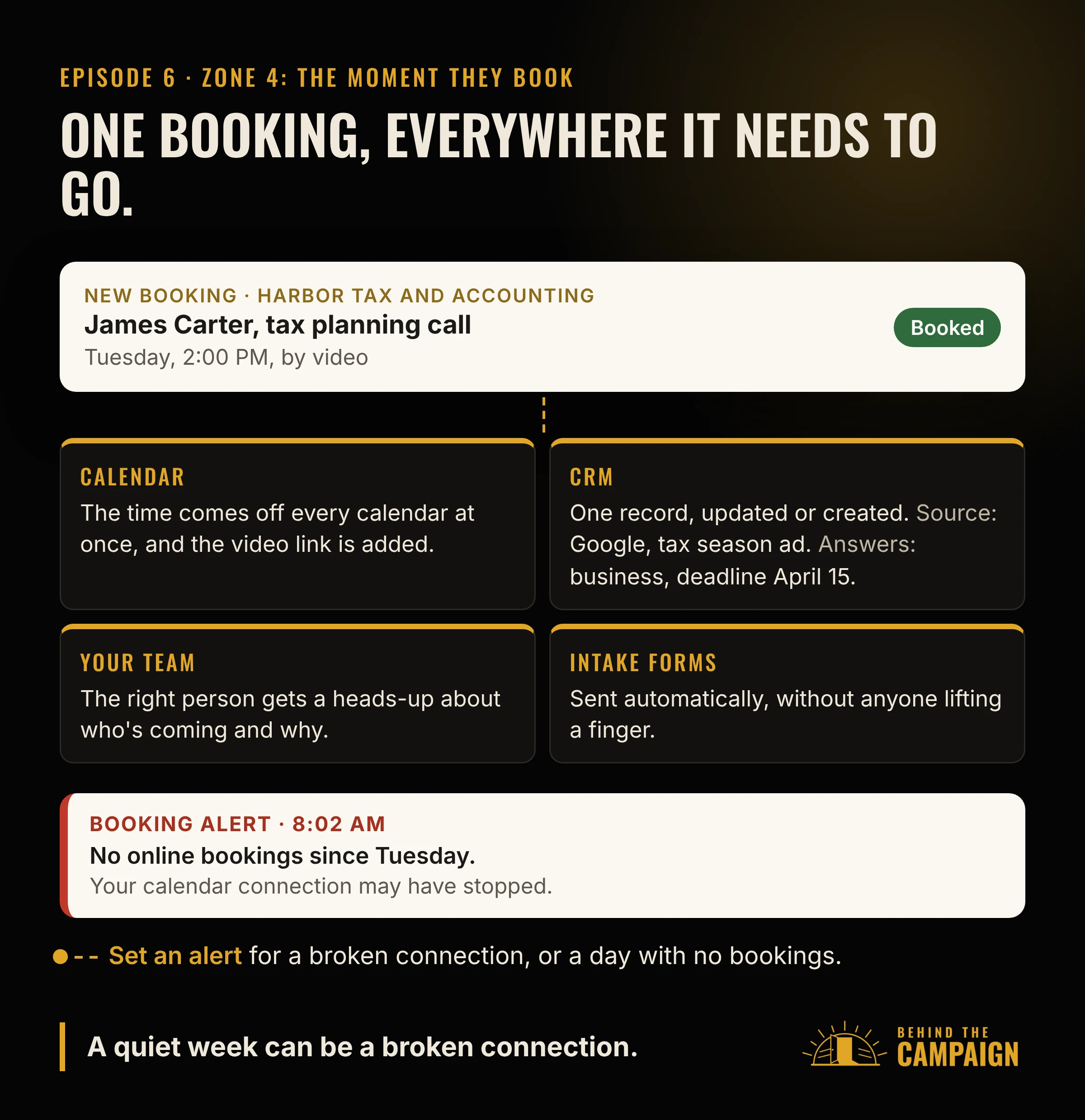
So the moment someone books, a few things should happen on their own. The time comes off every calendar at once. Your CRM updates their record, or creates one, never a duplicate, with where they came from and what they told you. If you caught episode four, The One Record Test, this is where that record gets built. Your team gets a heads-up about who’s coming, and any intake forms go out without anyone lifting a finger.
Then set an alert. If your calendar connection breaks, or a day goes by with no bookings when you’d normally have some, the owner should hear about it. A quiet week can be a broken connection.
The blueprint has a "what talks to what" page, so you can write down which tools hand off to which, and who gets the alert when something stops.
Zone 5: Before the appointment
So they’re booked. Now you have to get them there.
The fifth zone fails when nothing happens after someone books, so they aren’t sure it worked, or they forget. And it fails when changing plans takes a phone call during business hours. A lot of people won’t make that call. They just don’t show up.
The rule I’d hold onto here is simple. Make changing plans easier than not showing up.
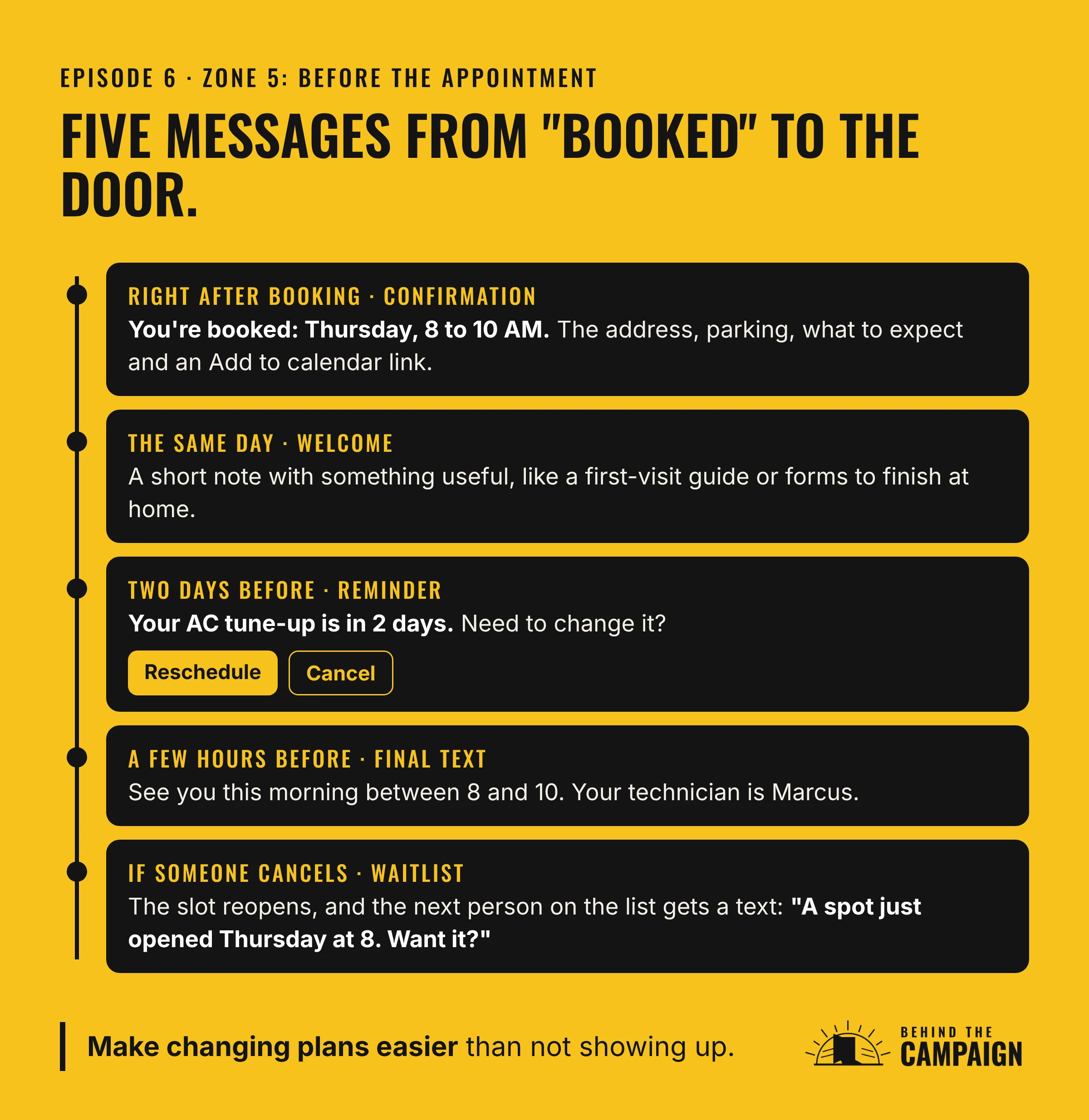
Five messages carry someone from "booked" to your door. The first is the confirmation, right away, by email and text. It’s the message people actually read, so put the address, parking and what to bring right in it. The second is a short welcome note with something useful, like a first-visit guide or forms to finish at home. The third is a reminder two days before, with a one-tap link to reschedule or cancel. The fourth is a final text a few hours before. And the fifth only goes out when someone cancels. The slot reopens, and the next person on your waitlist gets a text.
Reminders work, too. In a Cochrane review of the research, about 68 out of every 100 patients came to their appointments with no reminder. With text reminders, it was closer to 79. That’s nearly as good as phone calls, and in the studies that compared costs, the texts cost less. So if your team still calls to remind people, switch to texts, and spend the time you save calling the people who missed.
The blueprint lays out that message timeline for you to fill in: when each one goes, whether it’s email or text, and what it says.
Zone 6: After, then measure
The last zone turns one visit into the next, and keeps the whole system getting better.
It fails when nobody looks at the numbers, and when it goes stale, with old services and last year’s hours still bookable.
After the visit, mark it as attended or missed, every time, so your numbers tell the truth. Thank them, and offer to rebook while the visit is still fresh. A dental office asking "Same time in six months?" at the front desk keeps its schedule full months ahead. If someone doesn’t show, send a kind text that day offering a new time. Life happens, and how you handle it decides whether they come back.
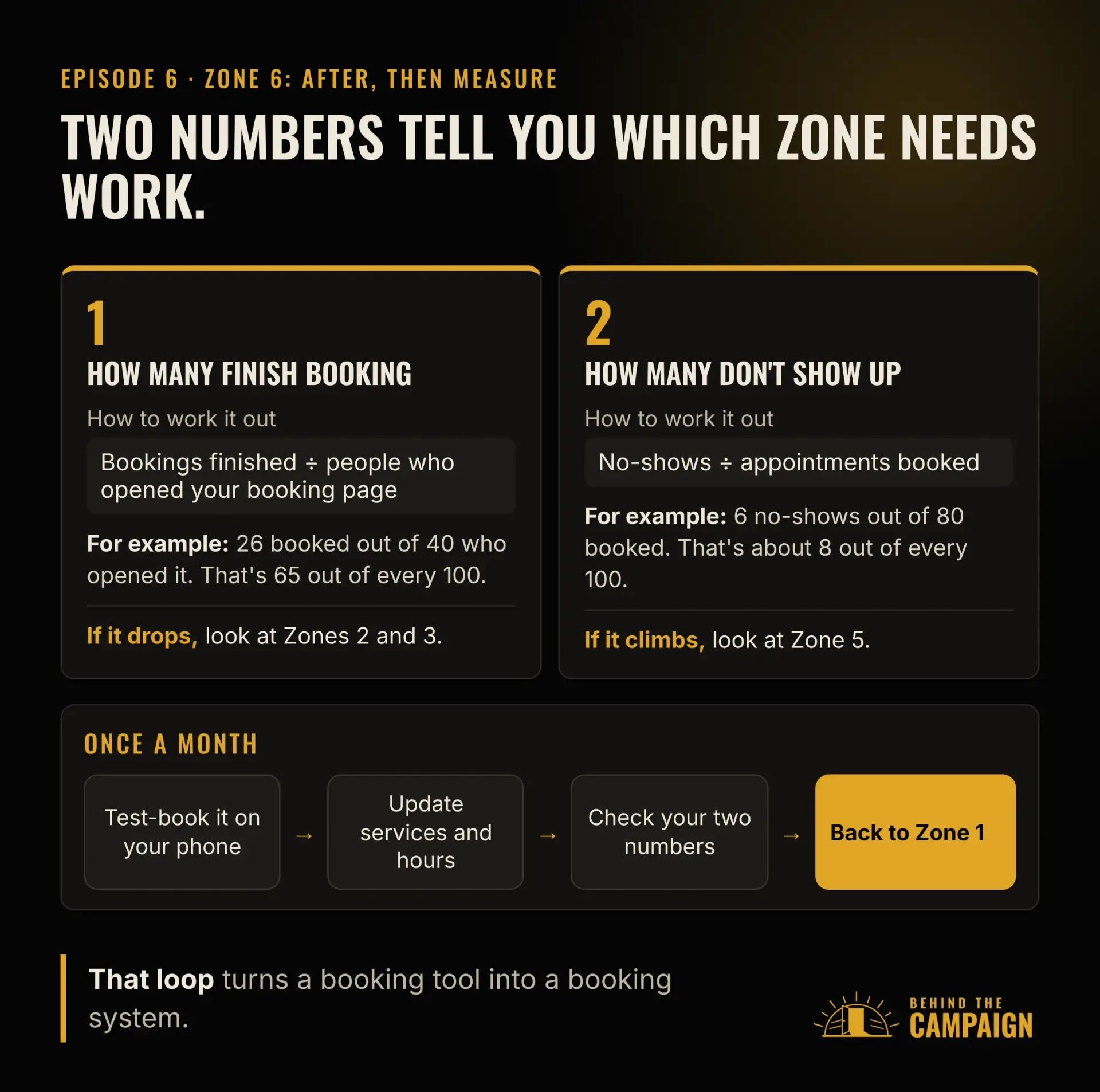
Then watch two numbers. The first is how many people finish booking, out of everyone who opens your booking page. If that drops, something in Zone 2 or Zone 3 is getting in the way. The second is how many booked appointments don’t show. If that climbs, look at Zone 5.
And once a month, book yourself on your phone, as a brand-new customer. It’s the fastest way to catch a broken connection, an old service or last year’s hours. Whatever you learn goes back into Zone 1: your rules, your questions and your messages. That loop is what turns a booking tool into a booking system.
The two numbers, with the simple math for each one, and a monthly review checklist are in the last zone of the blueprint.
Where to start
So where do you start? It depends on where you are today.
If you don’t have online booking yet, start with Zone 1. Take your three most-requested services and answer the four decisions for each one before you pick a tool. What are people booking? Can it be booked without a conversation? Instant, or approve first? A deposit, or not? The right tool depends on those answers, not the other way around.
If you already have online booking and it isn’t filling your calendar, book yourself this week. Do it on your phone, as a new customer, and notice where it gets hard. That moment tells you which zone to fix first. Near the front of the blueprint, there’s a "Where to start" box that matches six common problems, like "people book but don’t show up," to the zone that fixes each one.
And either way, borrow from other industries. Restaurants show you a table before they ask your name, and fitness studios text the waitlist the minute a spot opens. The blueprint has a playbook for each of seven industries, so a dental office, a law firm and an HVAC company can each see their own version.
Three things to remember
If you only remember three things from this episode, make it these.
A booking button is the front door, not the whole house. Most of it breaks after someone clicks Book.
Ask what they need, then show them a time, and save their details for last.
And make changing plans easier than not showing up.
If you want the whole map, the worksheets for every zone and the playbook for your industry, grab The Booking System Blueprint. It’s free, and it’s built to sit next to you while you set this up.
And if you’d like a second set of eyes on your booking system, or help planning one from scratch, book a free call. We’ll go through it together, zone by zone, and find the first fix worth making. My Booking and scheduling page covers how I build them.
Keep reading, or keep listening, for more ways to improve your marketing operations. If you haven’t read it yet, episode two covers the forms every business needs, the booking form included.
Next time, we’ll go behind another part of your marketing that’s quietly costing you customers.
