

 By Angel Flores

On this page9 sections
Your form says, "Thanks! We’ll be in touch."
This episode is about whether that’s true.
Right now, somewhere, a new patient is filling out a dental office’s form at seven o’clock on a Friday night. An accounting firm’s form just got a question about a business return, in the middle of tax season. Neither of them knows if anyone saw it. And neither do the businesses.
In episode two, you made your form worth filling out. Now you’re going to find out what happens after someone does. I’ll walk you through a test you can run this week, what your results mean, and the fixes, in the order I’d make them.
The quiet after "Thanks!"
Most businesses check that their form sends. Almost nobody checks what happens next.
Think about it from the other side. Someone fills out your form. They see "Thanks!" And then it’s quiet. While they wait, they’re filling out the next dental office’s form, or calling the next accountant on their list.
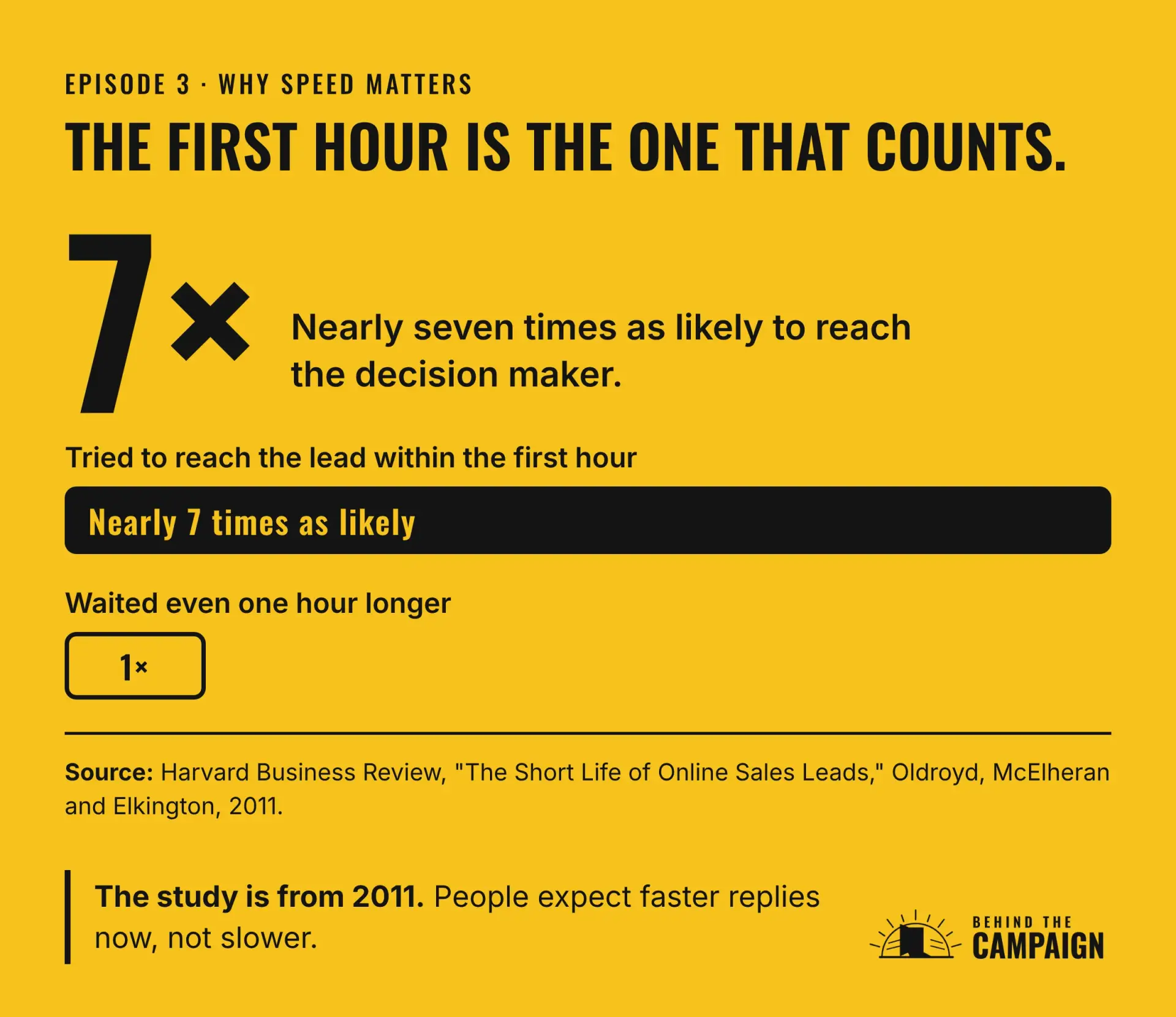
Speed matters more than most owners think. Harvard Business Review published a study back in 2011 called The Short Life of Online Sales Leads. It found that companies that tried to reach a new lead within an hour were nearly seven times as likely to have a real conversation with the decision maker as companies that waited even one more hour. And the longer they waited, the worse it got.
That study is from 2011. People have only gotten more used to quick replies since then.
Set up your secret shopper
Retail stores have used secret shoppers for years. Someone walks in as a customer and reports back on what really happened. You’re going to do the same thing with your own website.
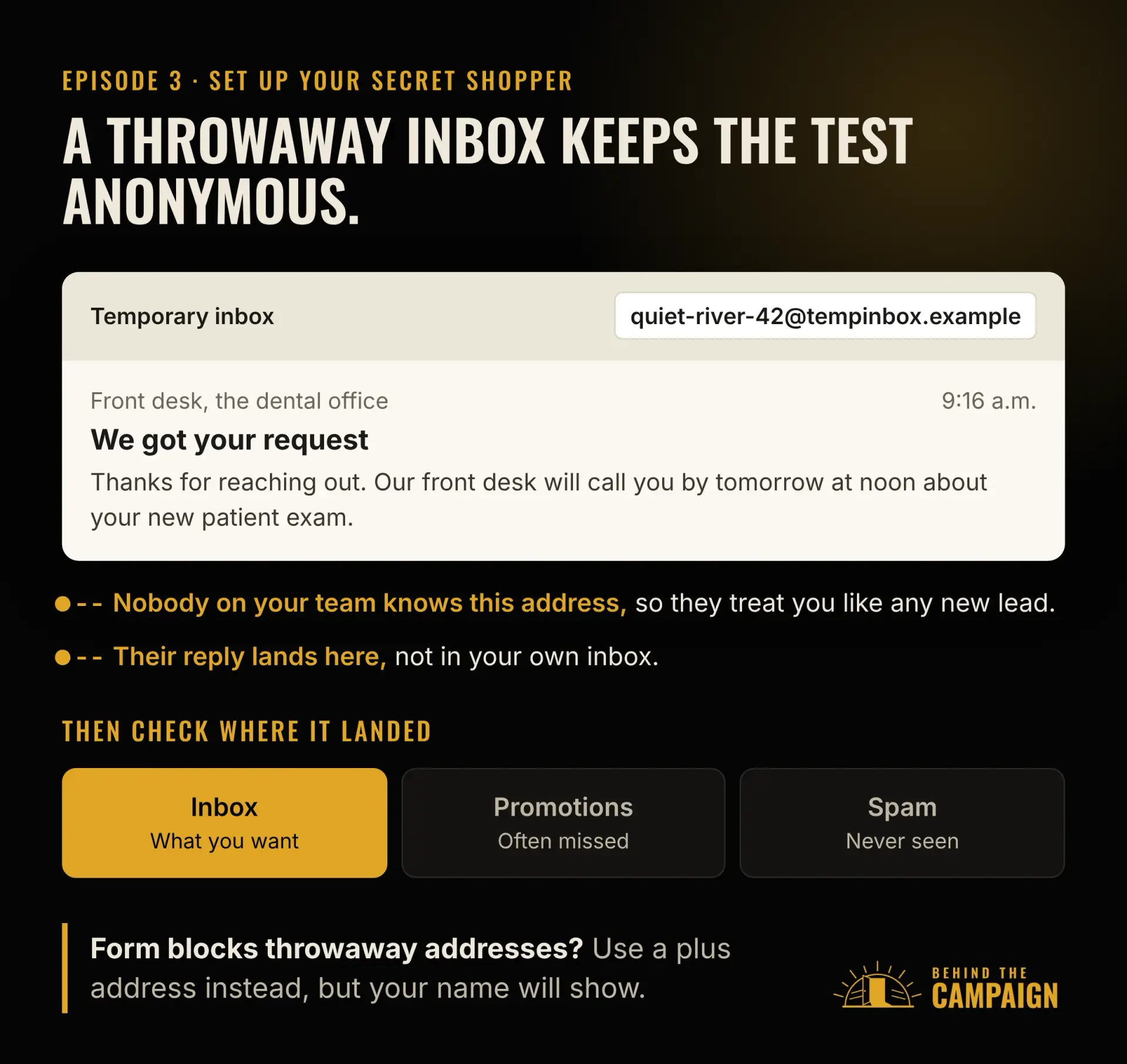
First, you need an email address that won’t give you away. The best option is a throwaway address from a temporary inbox service. Your team has never seen it, so they’ll treat your request like any other new lead, and you can watch the replies come in without anything landing in your own inbox.
If your form blocks the throwaway address, that’s the spam protection from episode two doing its job. In that case, you have a backup, what’s called a plus address. Take your normal email and add a plus sign and a word before the at sign, like your name, plus shopper, at gmail dot com. It still lands in your own inbox. Gmail supports this, and so does Microsoft 365, where it’s turned on by default. Just know the catch. Your name is still right there in the address, so anyone on your team who reads it closely will know it’s you.
Next, use a name and a phone number you’ll recognize, and ask a real question, so the reply has something to answer. For a dental office, that might be, "Do you take new patients with my insurance?" For an accounting firm, "Can you help with a business return this season?"
Send it from a private browser window, so you’re not logged in to your own site.
And don’t tell the team. You’re not testing the people. You’re testing the path a request takes, and you want to see what normally happens.
The secret shopper test
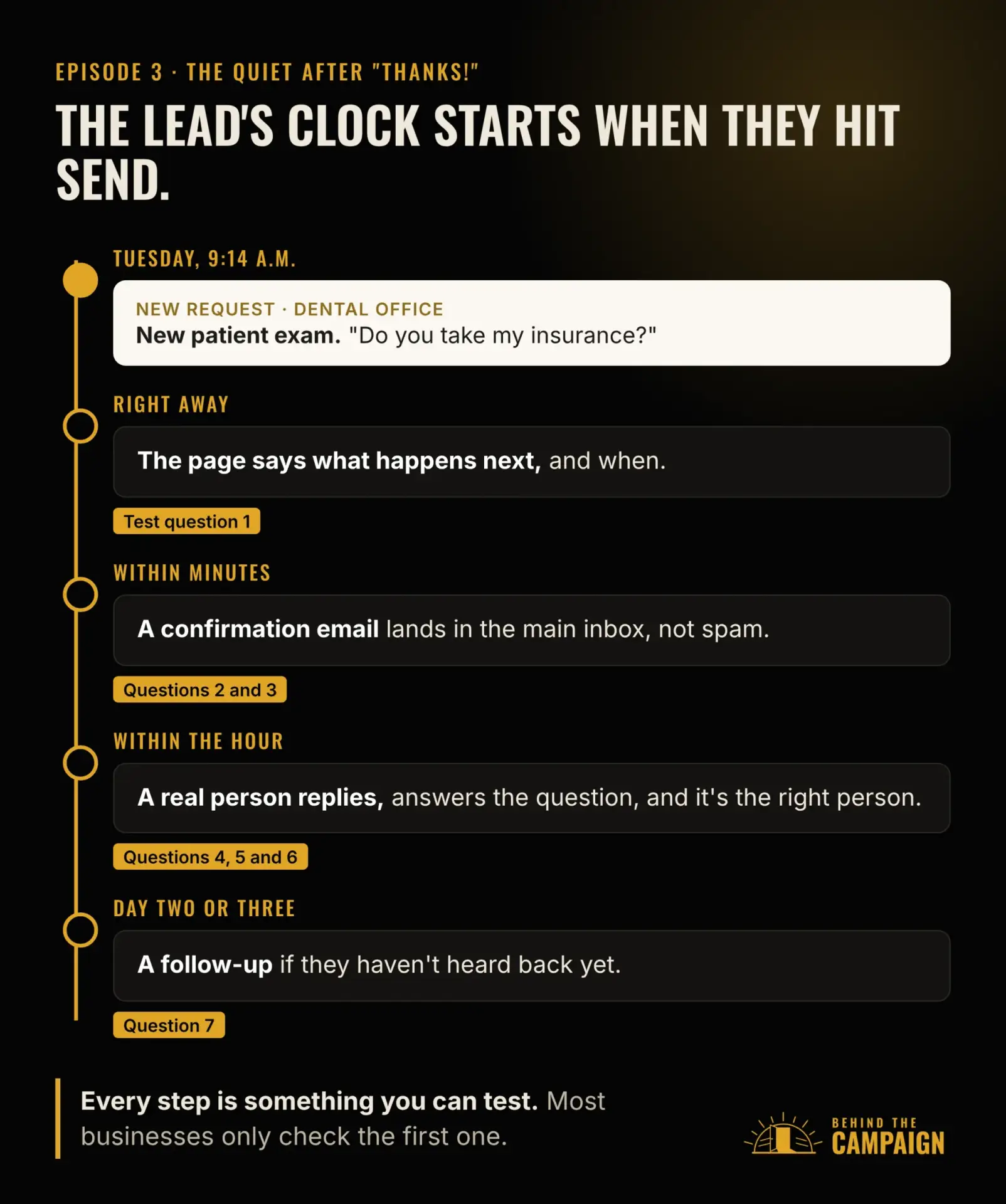
Here’s the test. Send your form on a normal weekday morning, write down the time, and then watch what happens. I’m going to ask you eight questions. Keep count of how many you can answer yes to.
First, after you sent it, did the page tell you what happens next, and when?
Second, did a confirmation email show up within a few minutes?
Third, did it land in your main inbox, not in spam or promotions?
Fourth, did a real person reply within the hour?
Fifth, did the reply answer your actual question, or was it a generic script?
Sixth, did it come from the right person? For the dental office, that’s the front desk. For the tax question, that’s an accountant.
Seventh, if nobody replied, did anything follow up on day two or day three?
And eighth, run the whole thing again at five o’clock on a Friday. Did anything let you know when you’d hear back?
If you want a bonus round, try one more. Mistype your own email address or phone number by one character, and see whether anything ever catches it.
What your answers mean
If nothing arrived at all, your form may be sending to nobody. Fix that first, before anything else.
If you got an automatic email but never heard from a person, the tool is working and the handoff to a human isn’t.
If the reply landed in spam, your website’s email isn’t set up to be trusted. We’ll fix that in a few minutes.
If a person replied, but the next day, the process exists. Nobody owns the clock.
If the reply didn’t answer your question, your form isn’t passing your answers along, or it isn’t asking the right questions in the first place. That’s episode two.
If the Friday test went silent all weekend, you need a plan for the hours when nobody can reply.
If you tried the bonus round and nobody caught the typo, nothing is confirming contact details. A real person with a typo in their email would simply never hear back.
And if you got a real answer within the hour, from the right person, you’re ahead of most businesses. Keep reading anyway, because the last fix is how you stay there.
Why it happens
Some of this goes back to episode two. If your form gets so much spam that people stopped checking it, a real lead is sitting in that same pile right now.
But usually, it’s simpler than that. The form sends to a general inbox that everyone assumes someone else is checking. Or the alerts still go to someone who left months ago, or to an address nobody reads.
The form isn’t connected to your CRM, your customer database, so the lead never gets an owner or a deadline.
The answers arrive as one block of text, so someone has to read the whole thing before anyone knows who should reply.
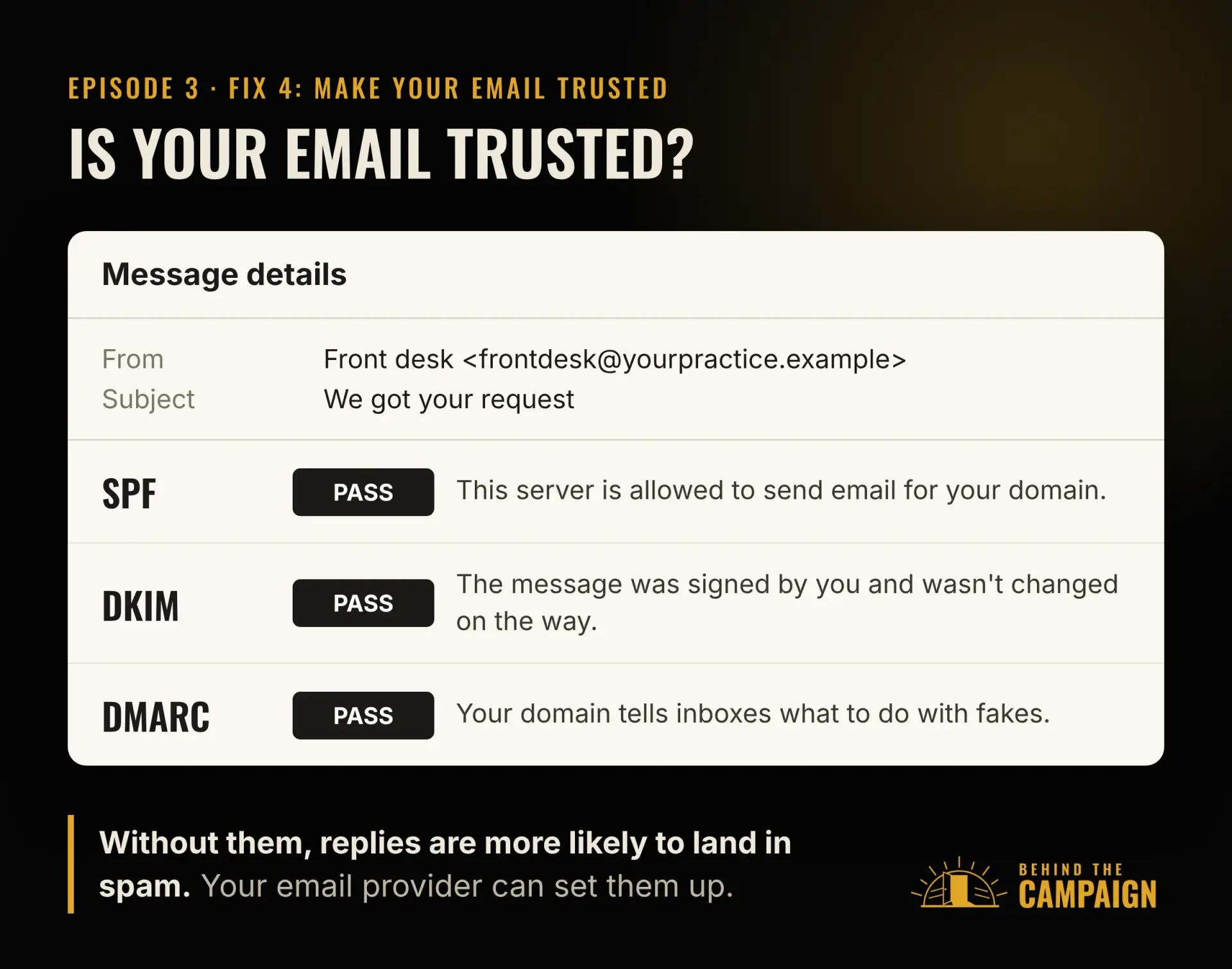
Your website sends email without the settings that prove it’s really you. Those settings have names, SPF, DKIM and DMARC, and without them, Gmail and Outlook get suspicious and send your replies to spam.
And nobody’s measuring response time, so nobody notices when it slips.
Your form isn’t an email forwarder
That first reason deserves its own minute.
A contact form that just forwards a message to an inbox is a second email address with a nicer layout. Nothing tracks the request. Nobody owns it. Nothing reminds anyone it’s still waiting. Managing leads is the part that turns a form into new patients and new clients, and that takes a CRM and a plan for every request, not an inbox.
Now, a lot of you are thinking, that’s fine, I don’t get that many form requests. It’s easier to just handle them from my inbox.
Here’s something I’ve learned from working with business owners. The fear that keeps them up at night usually isn’t that the business will never come. It’s that it finally does, and they’re not ready for it. If you’ve been in business long enough, that moment always shows up. The big referral. The busy season. The week your promotion actually works. And if your follow-up is a forwarded email in a crowded inbox, that’s the moment you miss your one shot.
When I served in the United States Army, we had a saying: train like you fight, and fight like you train. The way you prepare is the way you’ll react under pressure. Your follow-up works the same way. If you practice it the right way with five requests a month, it already works when you get fifty. Think of the dental office that runs a new patient special and gets thirty requests in one weekend, or the accounting firm that does fine from the inbox, right up until tax season.
So build for the business you want, not just the one you have today. A slow month is exactly the right time to set it up.
Fix it in this order
Here are the fixes, in the order I’d make them. There are six.
Say what happens next
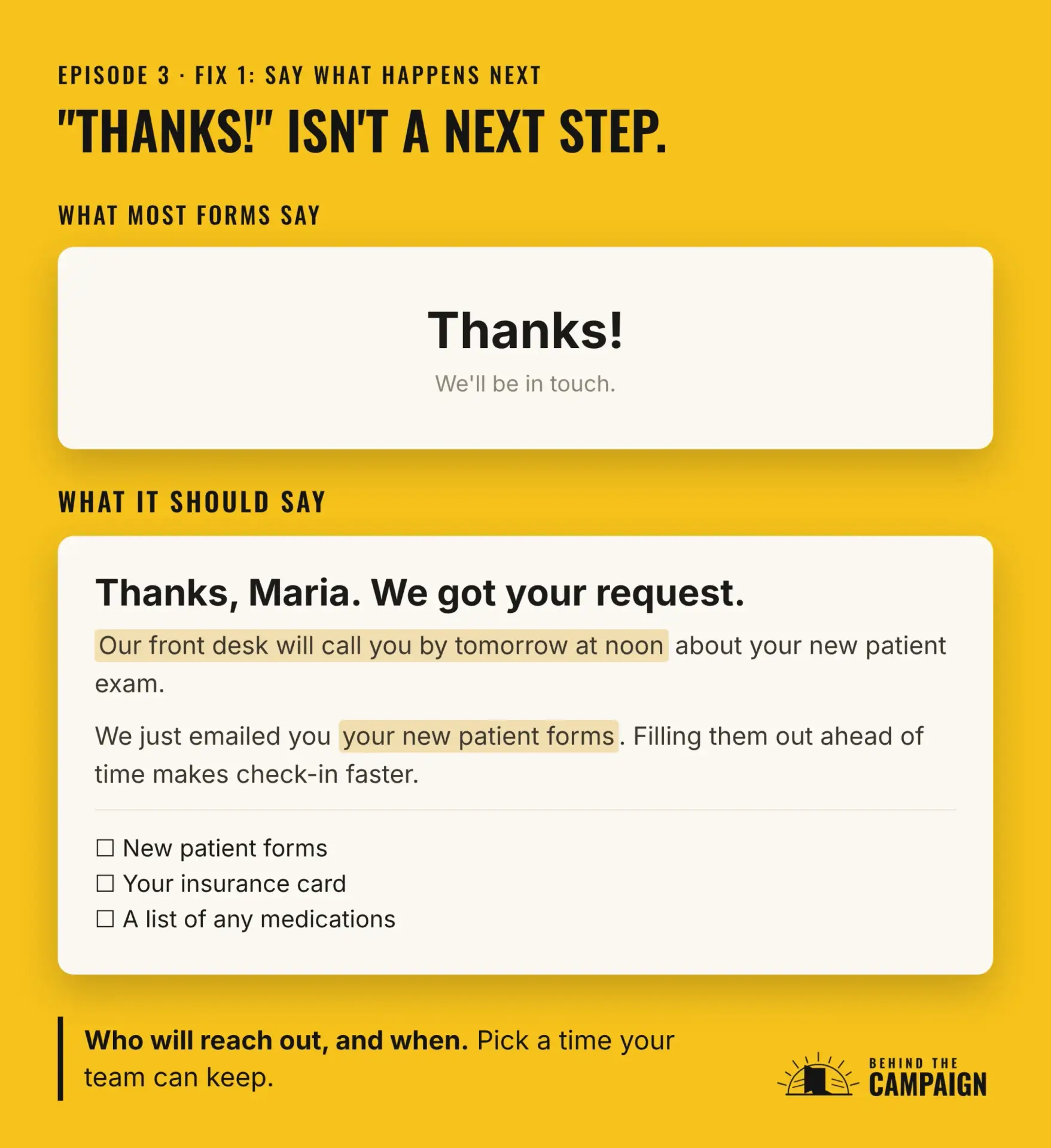
The first fix is the easiest. Replace "Thanks!" with a real next step and a time you can keep, both on the page and in the confirmation email. At a dental office, that might be, "Thanks, we got your request. Our front desk will call you by tomorrow at noon." At an accounting firm, "You’ll hear from one of our accountants within one business day."
Use a time your team can actually keep. A promise you miss is worse than no promise at all.
Give every lead an owner and a deadline, in a CRM
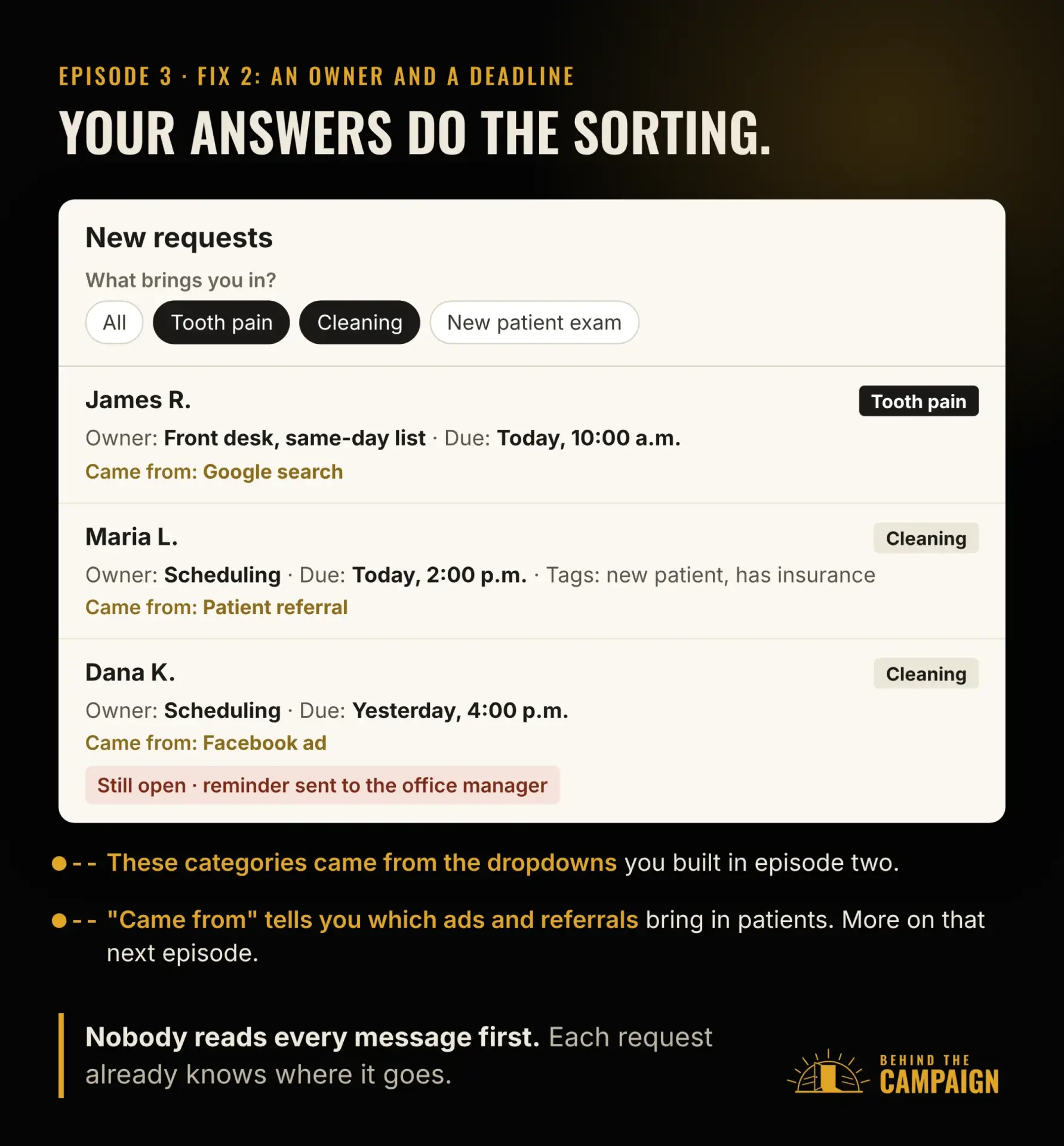
The second fix is the one that changes everything else. A CRM does four things an inbox can’t. It stores every request in one place. It filters them. It sends each one to the right person, with a task, a deadline, and a reminder if it’s still open. And it tracks where each lead came from and when, so over time you can see which ad, referral or page is actually bringing you new patients and new clients.
Remember in the last episode, when I told you to build dropdowns and pick-more-than-one questions into your form? This is where they pay off. Every answer becomes something your CRM can filter and sort on.
At a dental office, a request marked "Tooth pain" goes straight to the front desk’s same-day list. "Cleaning" goes to scheduling. "I’m a new patient" plus "I have dental insurance" adds an insurance check to the task. At an accounting firm, "Tax return" plus "I own a business" goes to the business tax team, and "before the filing deadline" moves it to the top of the list.
An empty message box can’t be filtered. Someone has to read it first, and that’s exactly where a lead sits and waits. My CRM and lead systems page shows what this looks like set up.
And that last thing a CRM does, tracking where every lead came from, is a bigger deal than it sounds. Ask most owners where their last five new clients came from, and they’ll guess. Hold onto that question. It’s where we’re headed next.
When you can’t reply right away, let your CRM start the conversation
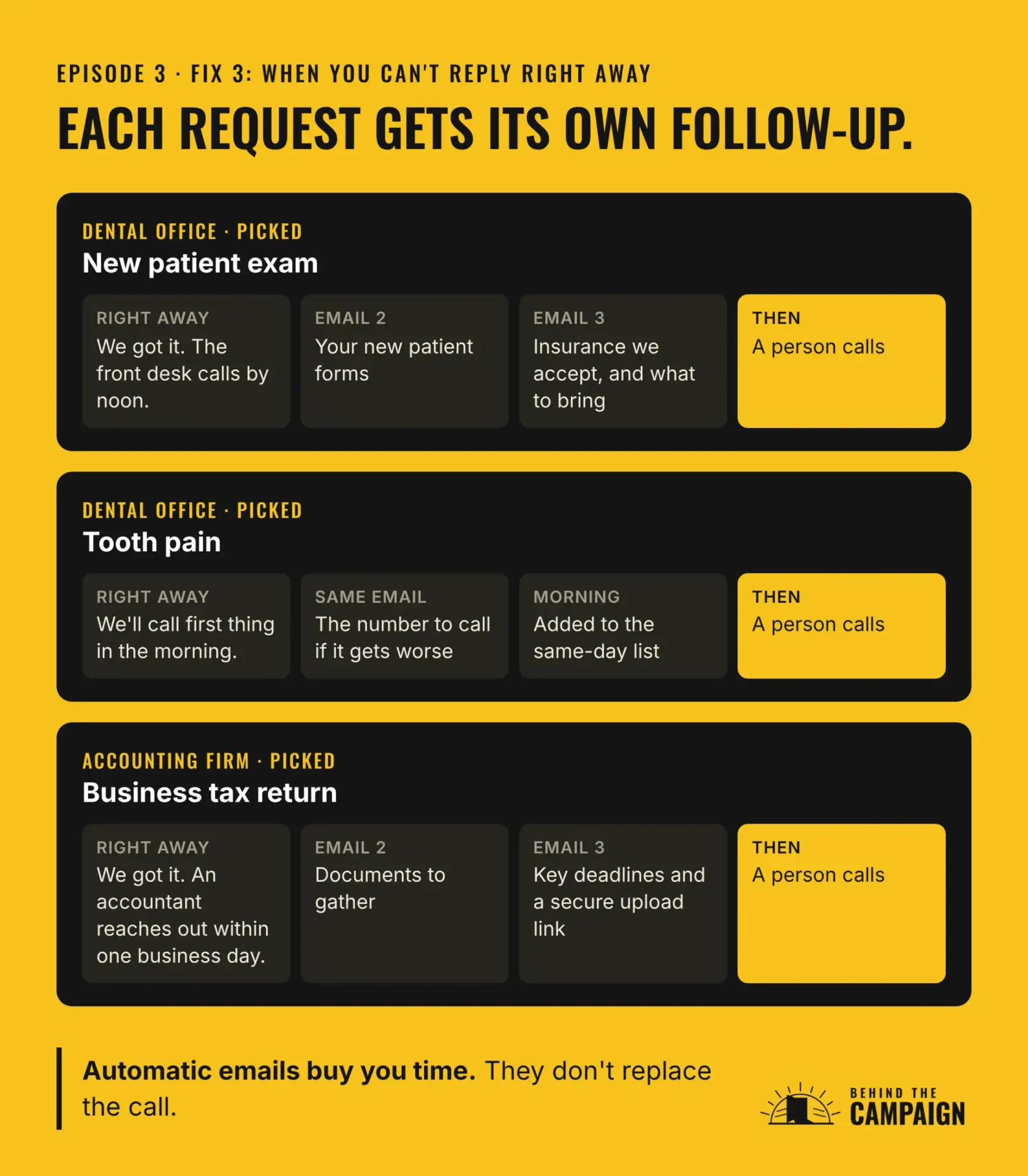
The third fix covers the gap between "sent" and the moment a person can call back. That might be a Friday night, a full schedule, or the busiest week of tax season. This is where you lean on your CRM.
Because the request was already sorted by the answers on the form, your CRM can send it into the right workflow, a short series of automatic emails made for that exact request. The first one confirms you got it and says when a person will reach out. The ones after that are actually useful, before anyone on your team has said a word.
At a dental office, someone who picked "New patient exam" might get the new patient forms, the insurance plans you accept and what to bring to the first visit. Someone who picked "Tooth pain" gets a message that says the front desk will call first thing, with the number to call if it gets worse before then. At an accounting firm, someone who picked "Tax return" and "I own a business" might get the checklist of documents to gather, the key deadlines and a link to upload files securely.
That only works because of episode two. A form that asks the right questions lets your automatic replies be personal and helpful, instead of one generic "Thanks for reaching out" for everyone. My Workflow automation page covers how these get set up.
One rule. These emails buy you time; they don’t replace the call. Every series ends with a person following up, and nothing should pretend to be a person when it isn’t.
Make your email trusted
The fourth fix keeps your replies out of spam. Make sure SPF, DKIM and DMARC are set up for your domain, and send your form emails through a proper email service instead of straight from your website. Your email provider, or whoever manages your domain, can usually set these up in an afternoon.
Confirm their email or phone number
The fifth fix is the one I promised you in episode two. We built your spam protection one layer at a time, starting with a honeypot, and I said there was one more filter. Here it is, and it does double duty.
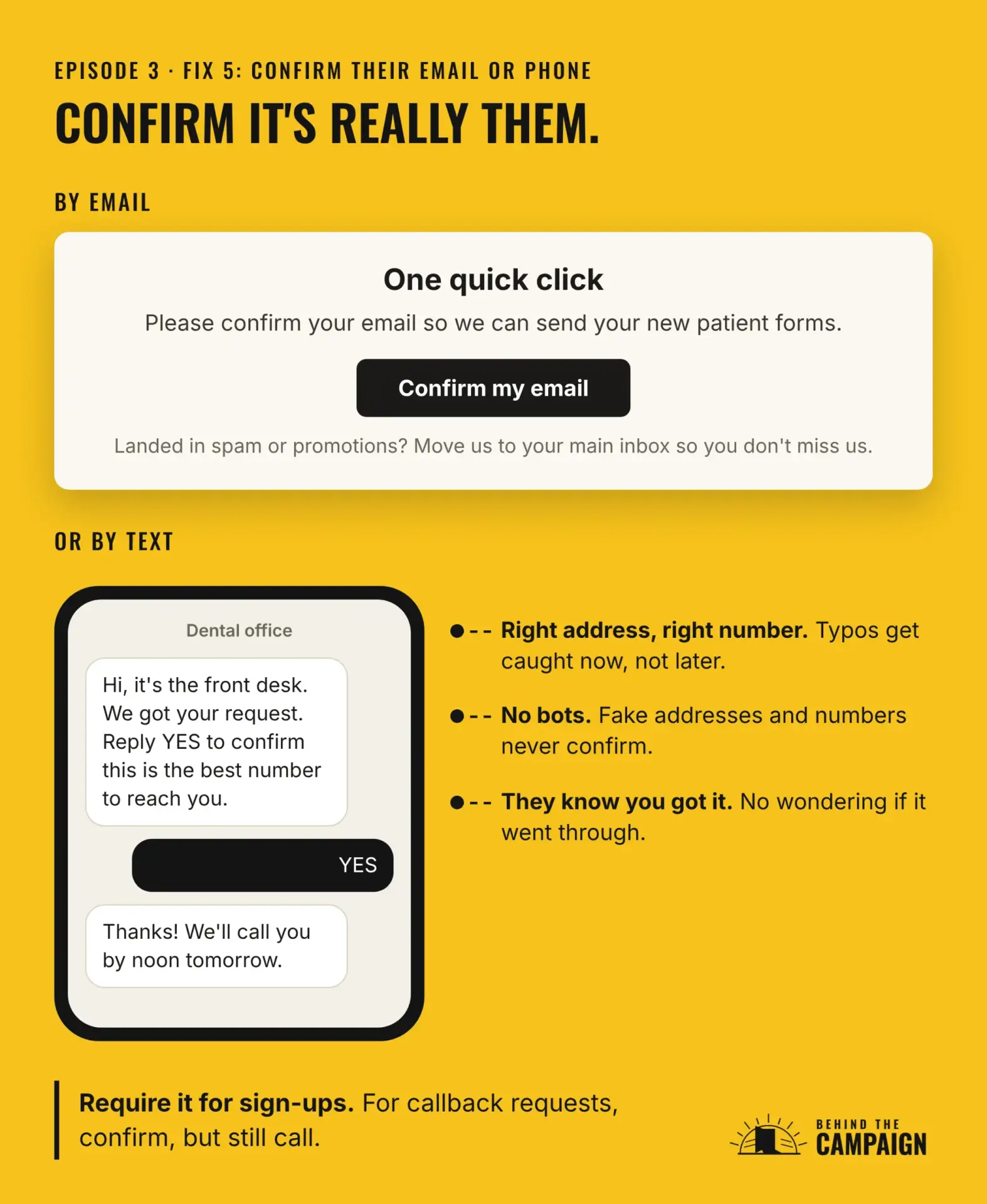
On a newsletter or download form, send a confirmation email with one button, and only add people once they click. Bots and fake addresses never click, so they never get in. The click also proves the address is real and typed correctly. And it’s the first time that inbox engages with you, which helps your later emails land where they should. In that confirmation, ask people to move you to their main inbox, or mark you "not spam" if you landed there. Google puts it plainly in its guidelines for email senders: "Confirm each recipient’s email address before subscribing them."
The same idea works for phone numbers. A short text like, "Hi, it’s the front desk. We got your request. Reply YES to confirm this is the best number to reach you." Or a one-time code they type in before they book. Either way, you know the number is right, they know you got their request, and fake numbers drop out.
This matters for follow-up, too. A reply can’t reach someone whose email has a typo, or whose number is off by one digit. Confirming up front means your follow-up actually lands, and the person feels confident you have their request.
Here’s where I’d use it. Require the confirmation for newsletter and download sign-ups. For bookings, a text code is fair. For a simple "please call me back" request, send the confirmation, but don’t hold the request until they click. The front desk still calls. And only text people who gave you their number for this. Your texting service will usually walk you through registering your business number with the phone carriers.
Put the test on a schedule
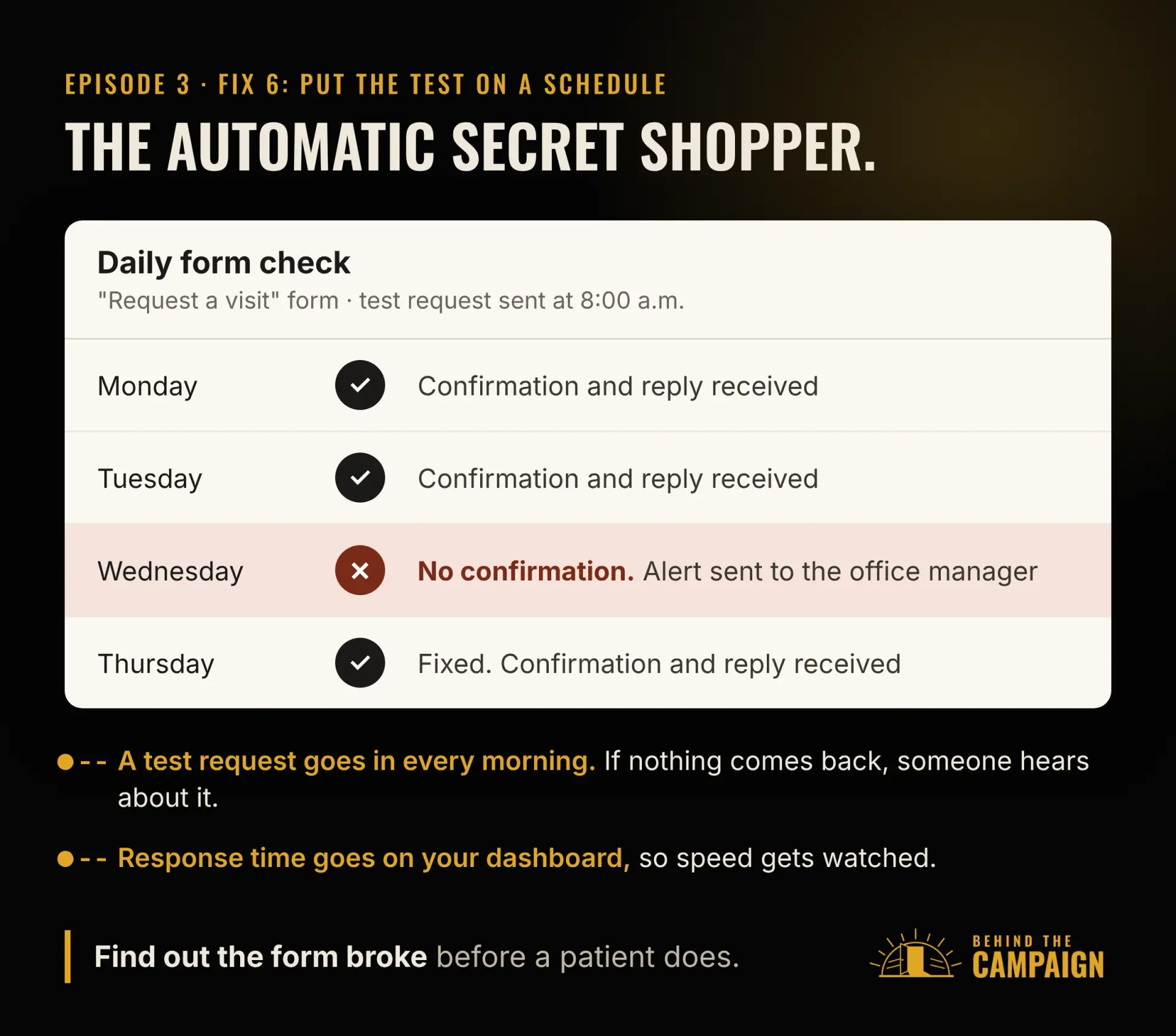
The last fix is how you stay ahead. Don’t run this test once. Put it on a schedule. An automatic secret shopper sends a test request every morning, and if no reply shows up, someone gets an alert. You find out your form broke before a patient does. Then put response time on your dashboard, so speed is something your team actually watches.
Tell me what you found
If you only remember three things from this episode, make it these. Tell people what happens next. Give every lead an owner and a clock. And test it on a schedule, not just once.
So run the test this week. Then book a free call and we’ll go through what you found together. I’ll show you the other places on your site worth a second look, the same way we just looked at your follow-up.
And keep reading, or keep listening. If you haven’t run the form test yet, start with episode two, The Form Nobody Fills Out. And if you’re still wondering whether your business needs someone looking after all of this, episode one, 7 Signs You Need Marketing Operations, is the place to start.
Next time, we’ll take on that question I asked you to hold onto: where did your last few customers actually come from? You might be surprised how hard it is to answer.
