

 By Angel Flores

On this page7 sections
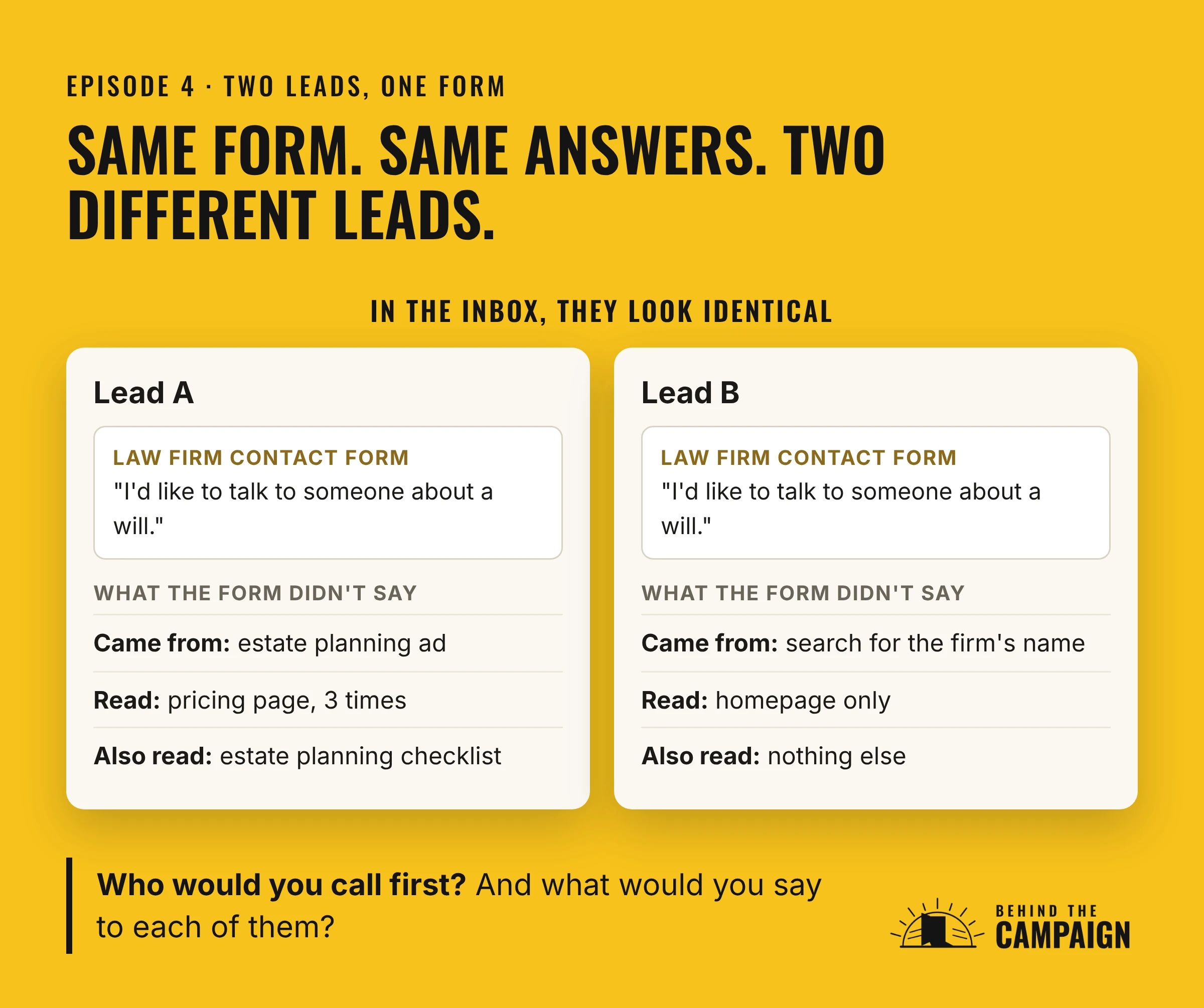
Two people fill out the same form on a law firm’s website, on the same afternoon. Same fields. Same kind of question: "I’d like to talk to someone about a will."
The first one clicked an ad for estate planning. She read the pricing page three times and the firm’s estate planning checklist before she filled out the form.
The second one searched for the firm’s name, landed on the homepage and filled out the form after one page.
In the inbox, they look exactly the same. So who would you call first? And what would you say to each of them?
Your form told you their names. It didn’t tell you their story.
In episode two, you made sure your form works. In episode three, you found out what happens after someone sends it. And at the end of episode three, I asked you a question: where did your last few customers actually come from? This episode is about why that question is so hard to answer. Today, we’re opening the record your form creates in your CRM, your customer database. I’ll walk you through a test you can run on one lead in five minutes, what your answers mean, and the fixes, in the order I’d make them.
"The form works" isn’t the finish line
Most businesses check two things. Does the form send? And does the inquiry show up? If the name, the email and the message arrive, they call it done.
But hoping your form fields get passed along is only a quarter of the picture. The fields tell you who someone is. They don’t tell you how they found you, what they care about or how ready they are.
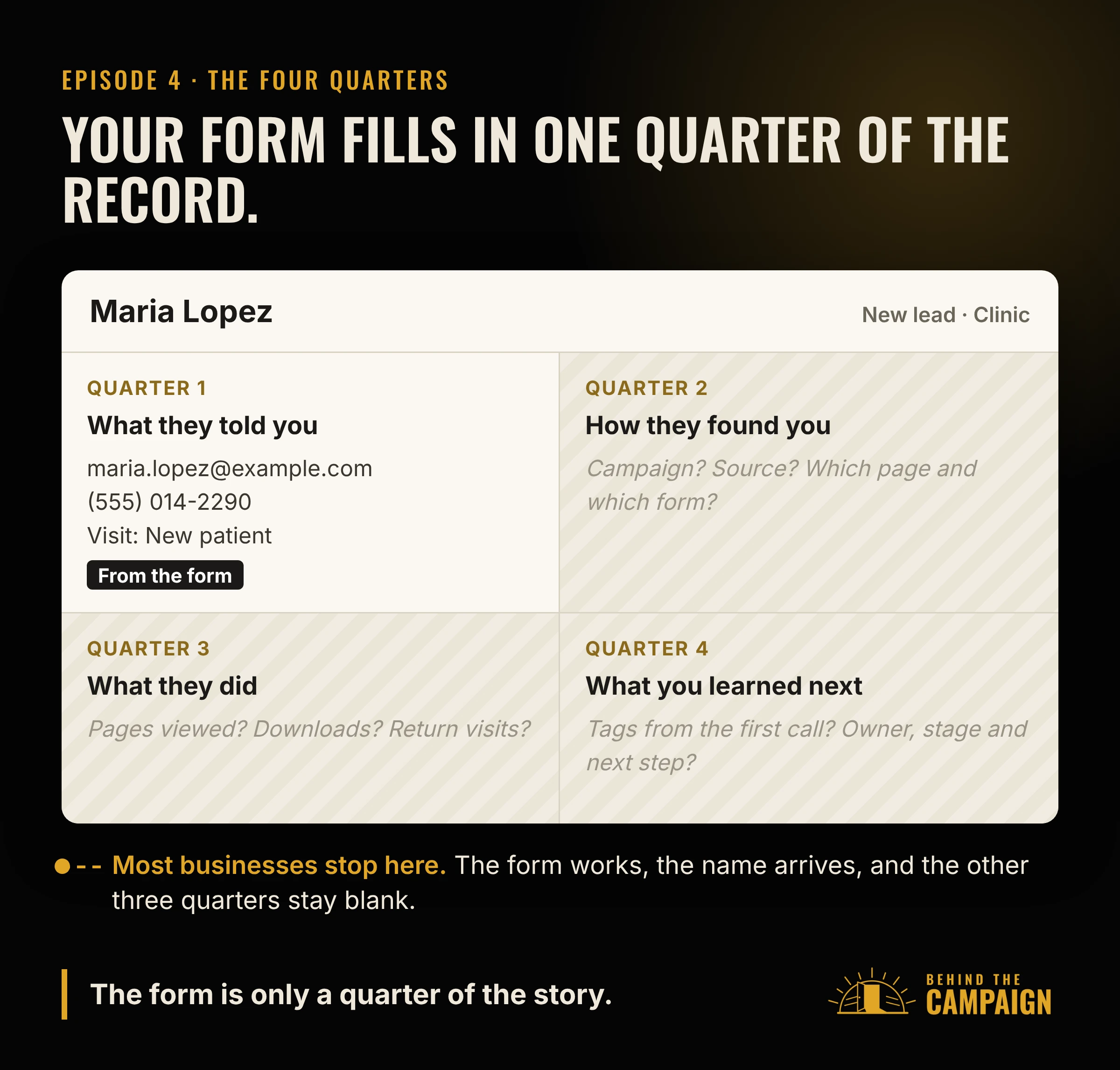
I think of every lead record in four quarters.
The first quarter is what they told you on the form. Their name, their contact details and their answers.
The second quarter is how they found you. The campaign, the source, and the page and the form they used.
The third quarter is what they did. The pages they read and the things they clicked, before and after they filled out the form.
And the fourth quarter is what you learned next. What they told you on the phone or in your follow-up, saved in a way you can sort and act on.
Why does that matter? Picture a home services company with two forms on its website, one for a quote and one for emergency repairs. If both kinds of leads land in the CRM as "Website," the burst pipe waits in the same pile as the kitchen estimate.
Or picture a dental office running a whitening promotion on Facebook. If those leads don’t arrive tagged with the promotion, nobody can tell whether it paid for itself. Next month, the office spends the same money again and hopes.
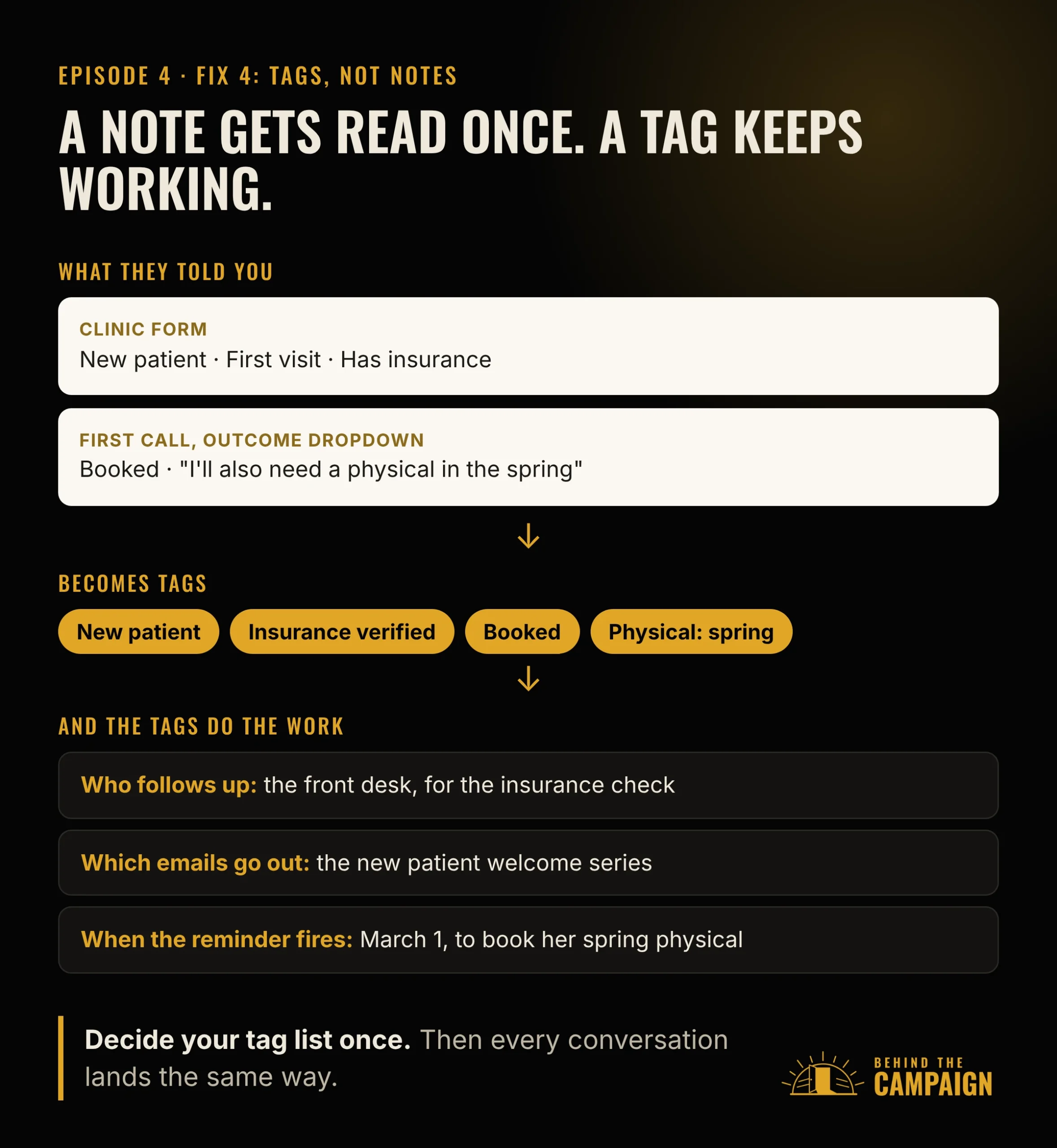
Or a clinic patient who mentions on the follow-up call, "I’ll also need a physical in the spring." Does that end up as a note nobody reads, or as a tag and a reminder to call her in March?
If the record only holds a name, you can’t decide where to spend your next marketing dollar. You can’t decide who to call first. And you can’t decide what to say when you do.
So let’s find out how much of the story your CRM actually has.
Where do your leads actually live?
Before we run the test, let’s be honest about where your leads live. For a lot of businesses, it isn’t a CRM. It’s the entries list in your form builder, like Gravity Forms or WPForms on a WordPress site. Or it’s the contact list in your email platform, like Mailchimp or Constant Contact.
Those tools are good at what they were built for. Your form builder is built to collect. Your email platform is built to send. Neither one was built to manage a relationship. Your form builder saves every submission as its own entry, so the person who writes in three times shows up as three strangers. Your email platform puts your newest lead on the same list as everyone who ever signed up for your emails. And neither one knows who owns a lead, what stage they’re at or when someone should call them back.
That’s what a CRM is for. Remember in episode three, when I said your form isn’t just an email forwarder? This is the same idea, one step further. Collecting a lead isn’t the same as managing one.
So run the test on wherever your leads live today. You’ll see exactly where that tool runs out.
The One Record Test
Open your CRM and pull up your newest lead. Just one. If your leads live in your form builder, your email platform, a spreadsheet or your inbox, open that instead.
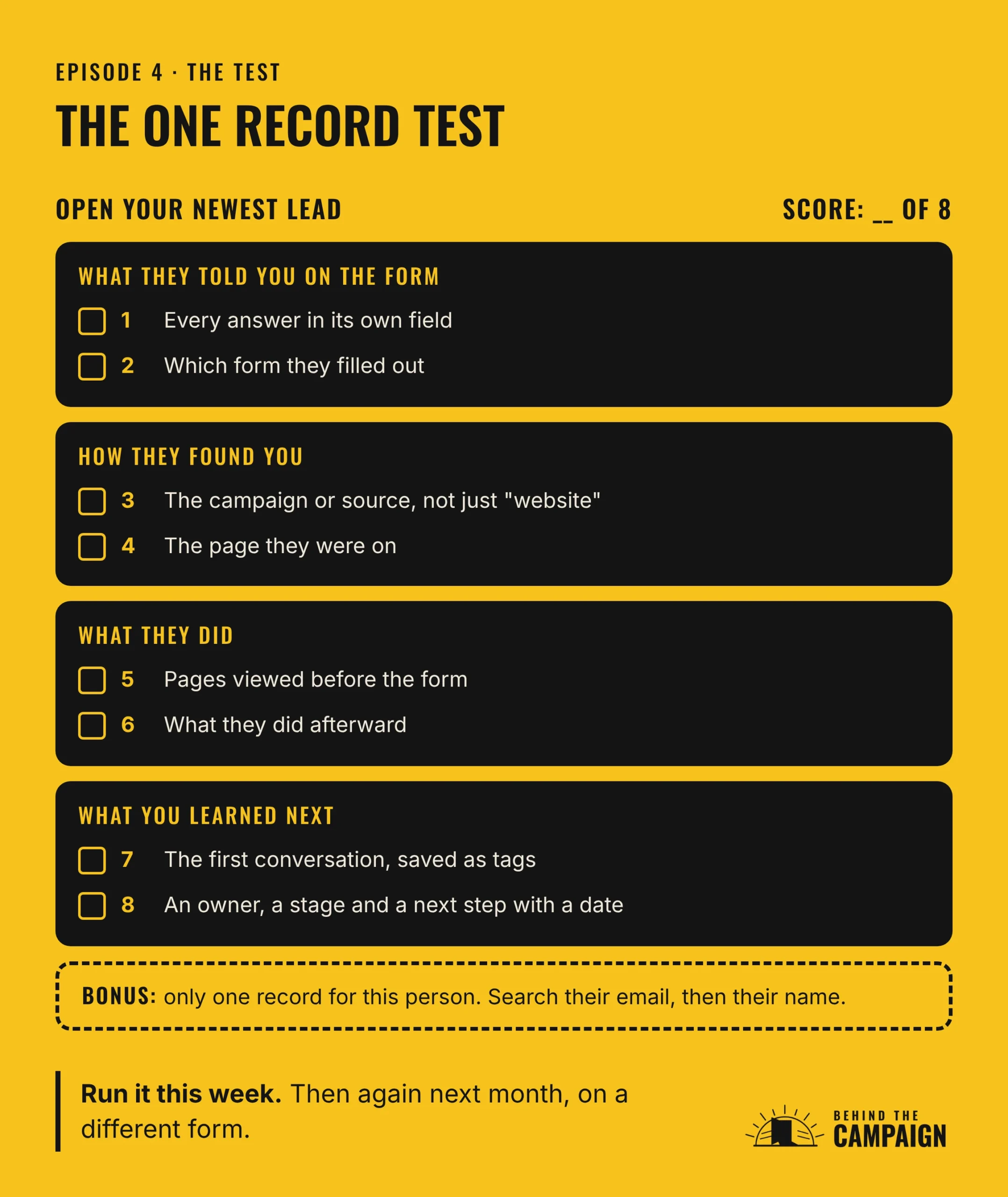
I’m going to ask you eight questions, two for each quarter. Keep count of how many you can answer yes to, from that record alone, without asking anyone.
First, what they told you on the form. Question one: can you see every answer they gave, each in its own field, and not one big block of text? Question two: can you tell which form they filled out, if you have more than one?
Next, how they found you. Question three: can you see the campaign or source that brought them in? I mean something specific, like "Facebook, whitening promotion," not just "website." Question four: can you see which page they were on when they filled out the form?
Next, what they did. Question five: can you see which pages they looked at before they filled out the form? Question six: can you see anything they did afterward, like coming back to your site, downloading something or opening your email?
And last, what you learned next. Question seven: did anything from your first conversation with them get saved as a tag or a field, and not just typed into a note? Question eight, and this one ties back to episode three: do they have an owner, a stage that matches how you actually work, and a next step with a date?
And one bonus question. Is there only one of them? Search their email address, then their name. If they show up twice, every number in your reports is a little bit wrong.
What your answers mean
How did you do?
If you only got questions one and two, your form works, and your CRM is a contact list. That’s the quarter most businesses stop at.
If you missed three or four, you can’t tell which of your marketing is working. Every campaign looks the same once the lead arrives.
If you missed five or six, you’re calling every lead with the same script, whether they read one page or ten.
If you missed question seven, what people tell you in the follow-up is living in someone’s head, or in notes nobody can search.
If you missed question eight, the lead has no clock on it. Episode three is all about that one.
If your leads live in your form builder or your email platform, questions seven and eight are probably where it ran out. That’s not a setting you’re missing. It’s a tool doing a job it wasn’t built for.
If you missed the bonus question, your reports are counting some people twice, and two people on your team may be calling the same lead.
And if you got all eight and the bonus, you’re ahead of most businesses I talk to.
So that’s the test. Now let’s fix what it found.
The fix, in the order I’d make it
Make every answer its own field
Let’s start with the first quarter. Every answer on your form should arrive in its own field in your CRM, not as one long message.
Remember the dropdowns and the pick-more-than-one questions you built in episode two? In episode three, they started sorting your leads. Here, they become fields your CRM can filter, count and report on.
And give each form its own name. "Emergency repair" and "Get a quote" should never arrive looking like the same thing.
Capture where they came from, automatically
The second quarter is how they found you, and the trick is to make sure nobody has to type it.
Start with the links you control: your ads, your emails, your social posts and even the QR code on your truck or your front desk sign. Add campaign tags to each one. They’re sometimes called UTM tags. It’s a short label on the end of the link that says which campaign sent the person. Google’s guide to campaign tags explains the idea: the tags let you see which campaigns are sending you visitors.
Then add hidden fields to your forms. The visitor never sees them. They quietly carry those campaign tags into the CRM, along with the page and the form name. Nobody types it, so nobody forgets it.
One thing to check. If someone lands on your whitening page and clicks around before they fill out the form, the tags can get lost along the way. Ask whoever set up your forms to make sure the tags follow the visitor from page to page, so the form still knows where they came from.
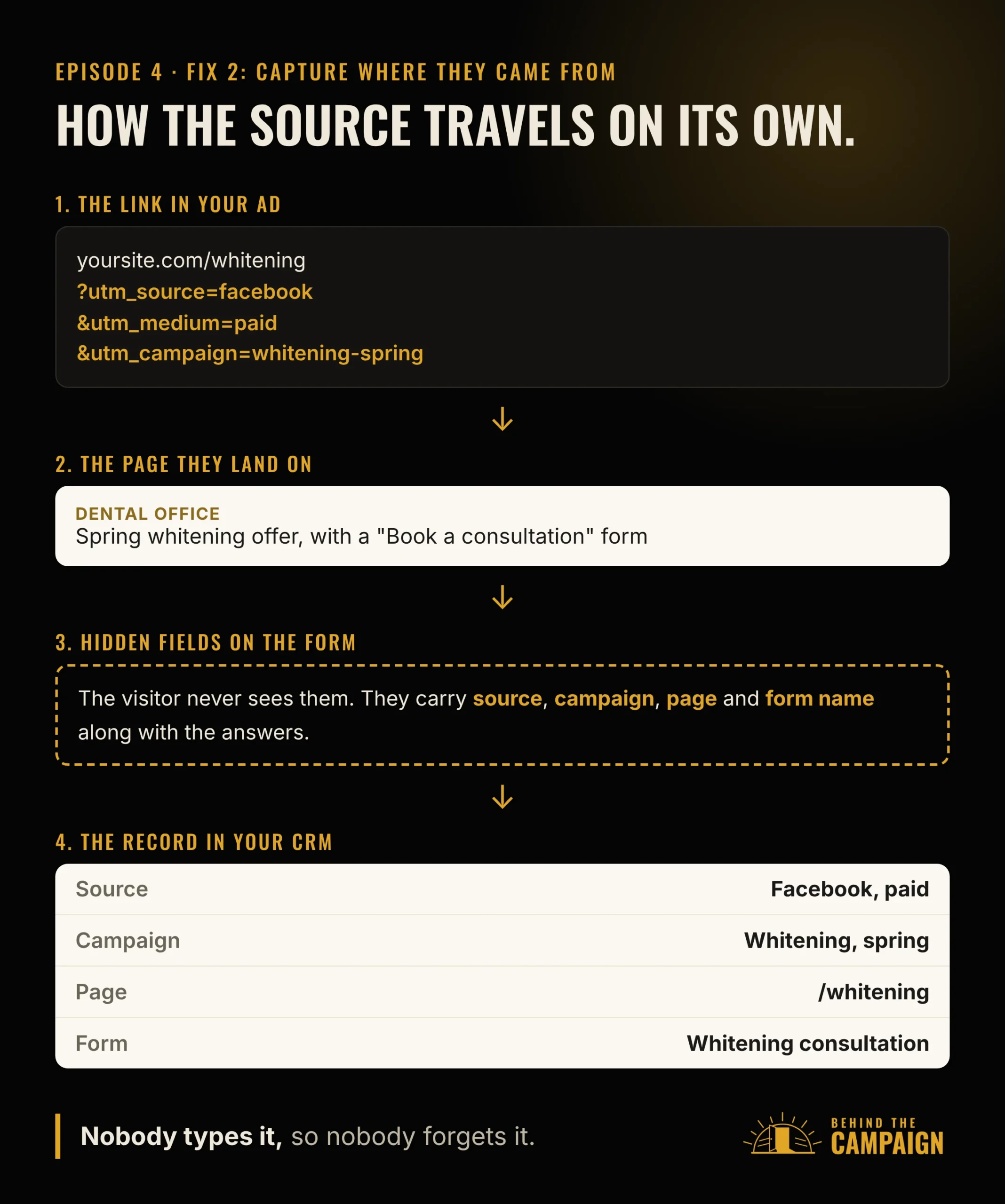
And keep a short, written list of the source names your team uses. Otherwise "Facebook," "FB" and "facebook ad" become three different sources, and none of your reports add up.
The same list works for the leads that don’t come through a form. When someone calls, ask how they heard about you, and save their answer in the same field, using the same names. A referral from a happy client should look like a referral, whether it came in by phone or online.
Connect what they do on your site to their record
The third quarter is what they did. Many CRMs offer a small tracking code for your website. Once someone fills out a form, it links the pages they’ve viewed and the things they’ve clicked to their record, and it keeps adding what they do after that.
That’s how the law firm from the beginning of this episode would know that one of those two people read the pricing page three times and the estate planning checklist. You’d call her first, and you’d open with estate planning, not "How can I help you?" That’s a different first phone call.
Or think about an accounting firm. A business owner reads the firm’s tax deadline checklist in January and doesn’t fill out a form. Two weeks later, the same person comes back, reads the page about business returns and asks for a call. Without the tracking code, that looks like a brand-new lead out of nowhere. With it, the accountant knows exactly what they’ve been reading and why they’re calling now.
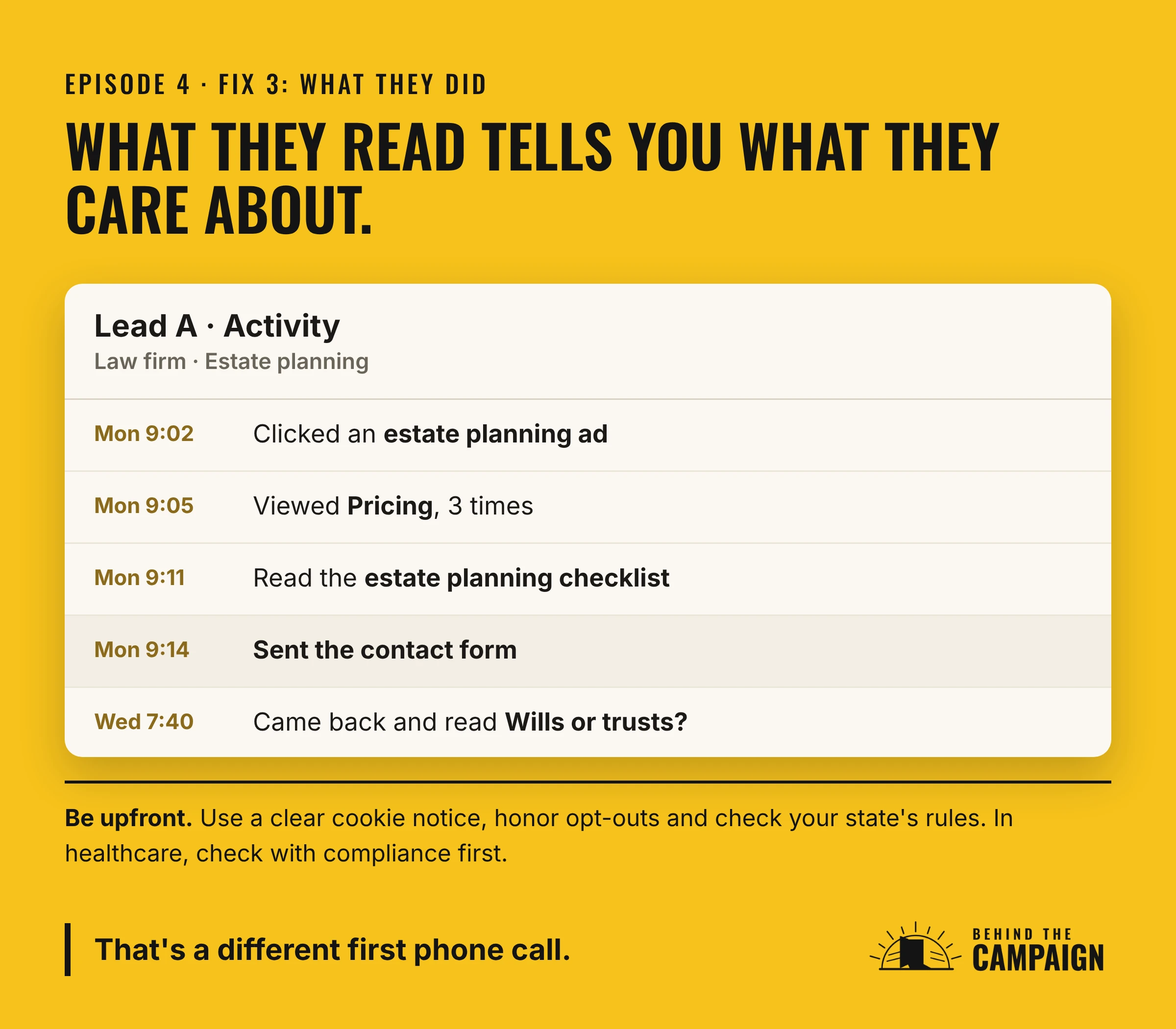
Be upfront about tracking. Use a clear cookie notice, honor people who opt out, and check what your state requires. And if you’re in healthcare, talk to whoever handles your compliance before you add tracking. Patient privacy rules are stricter, and they apply to your website too. I’m not your lawyer, so if you’re not sure, ask one.
Turn what they tell you into tags, not notes
The fourth quarter is what you learn after the form. And here’s where most businesses lose the most.
Someone on your team has a great first conversation. The patient mentions the spring physical. The homeowner says they’re also thinking about the roof next year. And it all goes into a note, in a paragraph, where nobody will ever find it again.
Decide on a short list of tags, once. Things like "New patient," "Insurance verified," "Roof next spring" or "Referred by a client." Then add a simple dropdown for how the first call went, so every follow-up conversation lands in the record the same way.
Then let those tags do the work. They decide who calls next, which follow-up emails go out and when the reminder fires.
Keep the record trustworthy
None of this helps if you can’t trust the record.
Turn on your CRM’s duplicate check, and decide what counts as the same person. Is it the same email? The same phone number? Write it down.
And give one person the job of approving changes to your fields, your stages and your source names. Here’s one I see all the time. Someone renames a lead source to tidy things up. It seems harmless. But the dashboard was counting leads by the old name, so it quietly stops counting them. Nobody broke anything on purpose. The numbers just went wrong, and nobody noticed for weeks.
Look at it every week
Last, put it on your calendar. Pick one simple report, new leads by source, and look at it every week. If too many leads say "website" or "unknown," your tags are leaking somewhere.
Then run the One Record Test again, on a lead from a different form.
Three things to remember
If you only remember three things from this episode, make it these.
The form is only a quarter of the story.
Capture where they came from and what they did automatically, so nobody has to remember.
And turn what they tell you into tags you can act on, not notes nobody reads.
So pull up your newest lead this week and run the test. Then book a free call, and we’ll go through what you found together. I’ll show you the other places worth a second look, the same way we just looked at one record. My CRM and lead systems page covers how I set this up.
And keep reading, or keep listening, for more ways to improve your marketing operations. If you haven’t run the secret shopper test yet, start with episode three.
Next time, we go back to your forms, and why your contact form shouldn’t be the only way people can raise their hand.
